The Uttar Pradesh Higher Education Services Commission (UPHESC) has officially published the UPHESC Assistant Professor Answer Key 2026. Candidates who appeared for the offline examinations held on April 18 and 19, 2026, across 33 subjects can now access their response sheets. This recruitment cycle aims to fill 981 Assistant Professor vacancies through a rigorous selection process involving a written examination and an interview.
For those who wish to review their performance or challenge discrepancies, the objection portal is currently active. You can Download Official UPHESC Assistant Professor Answer Key 2026 right away. If you find any discrepancies, make sure to submit your feedback before the deadline closes on April 28, 2026 (12 midnight).
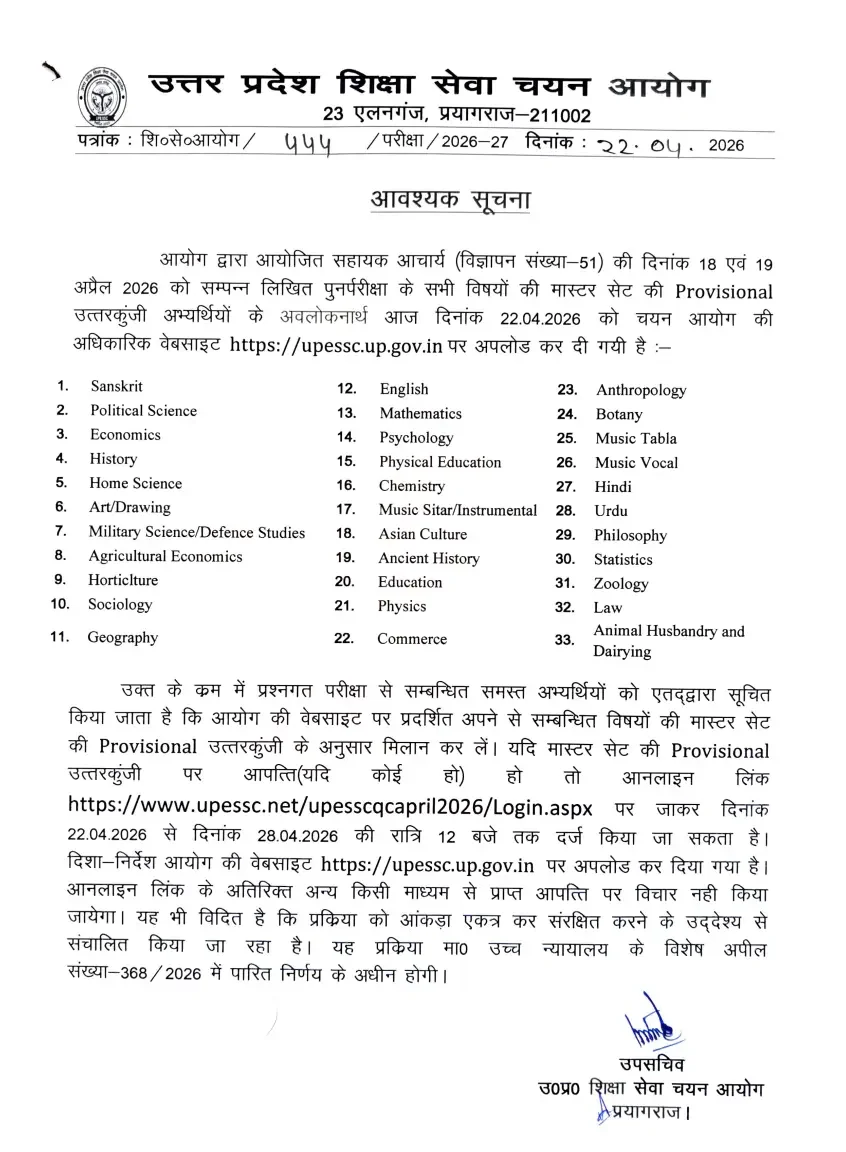
UP Assistant Professor Answer Key 2026 - Overview
Review the essential highlights of the recruitment examination and answer key release using the structured data table below:
| Organisation Name | Uttar Pradesh Higher Education Services Commission (UPHESC) |
| Post Name | Assistant Professor |
| Vacancies | 981 |
| Answer Key Release Date | 22nd April 2026 |
| Objection Dates | 22nd to 28th April 2026 (12 midnight) |
| Exam Date | 18th & 19th April 2026 |
| Negative Marking | Nil |
| Selection Process | Written Examination Interview |
| Official website | https://uphesc.org |
UPHESC Assistant Professor Marking Scheme 2026
Understanding how scores are computed helps in estimating your selection chances accurately:
- Correct answer: +2 marks
- Incorrect answer: No negative marking
- Unanswered Question: 0 mark
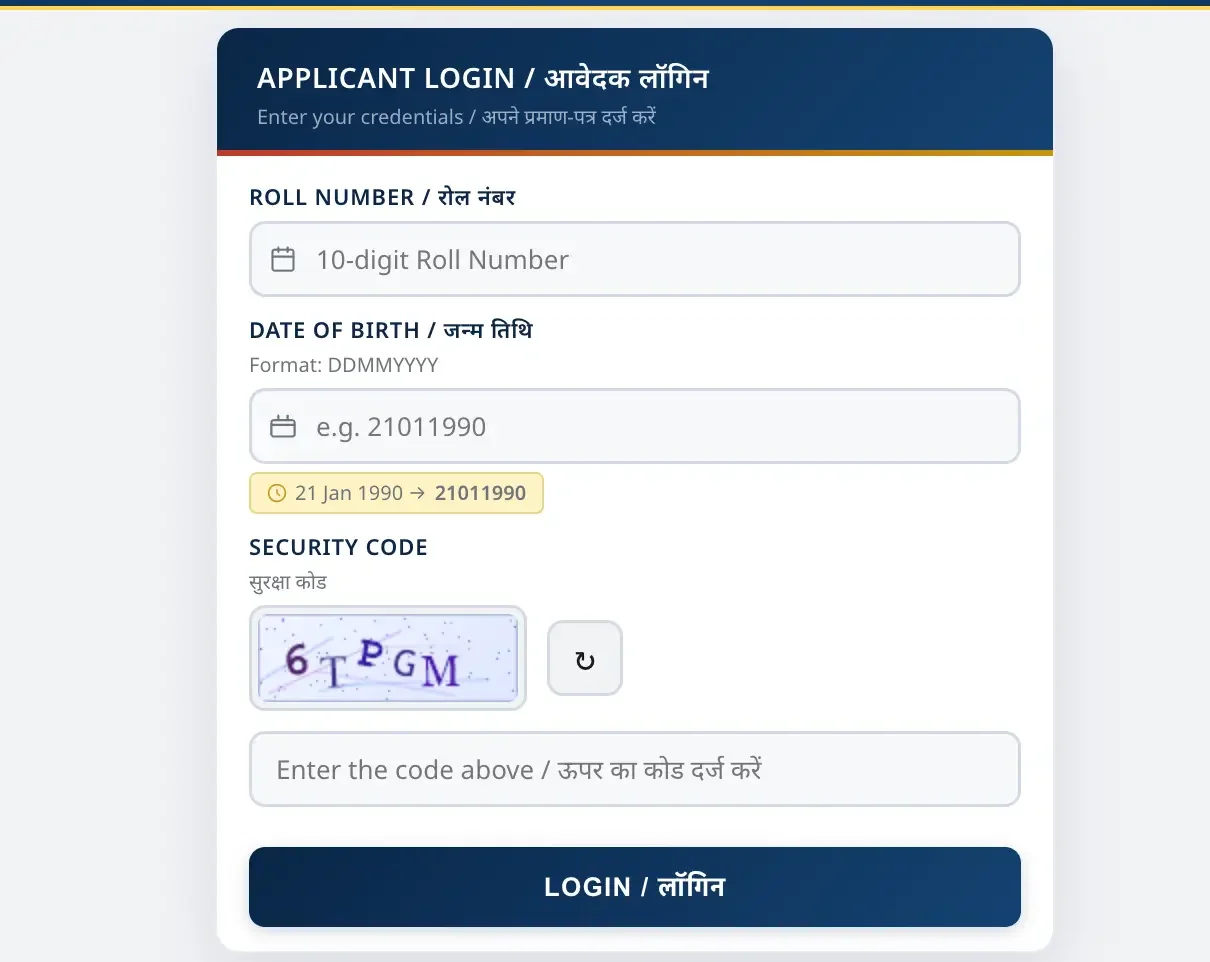
How to Download UPHESC Assistant Professor Response Sheet 2026
To check your answers against the official key, follow these step-by-step guidelines:
- Open the official website of UPHESC https://uphesc.org.
- Click on “सहायक आचार्य (वि० सं० 51) Answer Key: प्रश्न आपत्ति (Qs. Objection)” under Notice Board.
- A login page appears on the screen.
- Enter your roll number + date of birth. Fill in the security code.
- Your UPHESC Assistant Professor Answer Key appears on the screen.
- Download the answer key for the subject you have appeared in the exam.
- Cross-check all the responses and calculate the approximate marks.
Steps to Raise Objections Against the UP Assistant Professor Answer Key 2026
If you spot an error in the provisional answer key, you can challenge it without incurring any fees:
- Visit the official UPHESC website, https://uphesc.org
- Download the provisional answer key PDF and identify the question number, subject, and answer option that you wish to challenge.
- Prepare your objection in a clear format by mentioning the question number, your claimed correct answer, and the reason for the challenge.
- Attach valid supporting documents, such as textbook references, academic sources, or any official study material, in a PDF format.
- Send the objection to the official email ID as given in the notice.
You can utilize the direct link to submit feedback here: Click Here to Raise Objections (UPHESC 2026).
How to Calculate Marks by Using UP Assistant Professor Answer Key
Estimate your written exam performance using this procedure:
- Download the official answer key PDF of your shift.
- Compare your responses with those provided by the Commission.
- Count the number of correct answers and multiply by 2 marks.
- Do not deduct any marks for wrong answers, as the exam has no negative marking.
- The probable marks are what you have counted as the correct answers.
What to Do Next?
Once you have calculated your scores and filed any necessary challenges before the April 28 deadline, keep track of further announcements. You can check the UPHESC Assistant Professor Result 2026: Official Status & Link for updates on scorecards and upcoming interview schedules. Additionally, candidates can review the question paper archives via Access UPHESC Assistant Professor Question Paper 2026 Here to prepare thoroughly for future evaluations or interview rounds.
Frequently Asked Questions (FAQs)
Recommended Reads
- UPHESC Assistant Professor Exam 2026: Schedule, Pattern, and Selection Process
- UPHESC Assistant Professor Exam City Intimation Slip 2026 Out – Download Link & Dates
- UPHESC Assistant Professor Admit Card 2026 Out – Download Hall Ticket
- UPHESC Assistant Professor Result 2026 Declared: Check Subject-Wise PDFs & Cut Off
- AIIMS NORCET 11 Prelims Exam City 2026: Release Date, Steps & Details
- AP TET Response Sheet & Initial Answer Key 2026 Released: Check Scores & Raise Objections
Negative Marking & Net Score Calculator
Calculate your exact post-answer-key net marks after deducting 1/3rd or 1/4th negative penalty across SSC, UPSC, and State exams.
Never miss another exam update!
Get the fastest exam results, recruitment news, and educational guides delivered directly to your phone.