The Staff Selection Commission (SSC) has officially reopened the SSC CPO 2025 slot selection window, providing a crucial opportunity for registered applicants to lock in their preferred examination parameters. With the Computer-Based Test (CBT) fast approaching, candidates must act promptly to finalize their exam city, date, and shift.
This recruitment drive features a total of 5,308 vacancies for Sub-Inspector (Executive) in Delhi Police and Sub-Inspector (General Duty) in CAPFs, drawing immense interest from over 5.6 lakh registered aspirants nationwide. Ensuring a seamless testing experience is a priority, and the reopened window allows participants to optimize their schedule ahead of the examination dates.
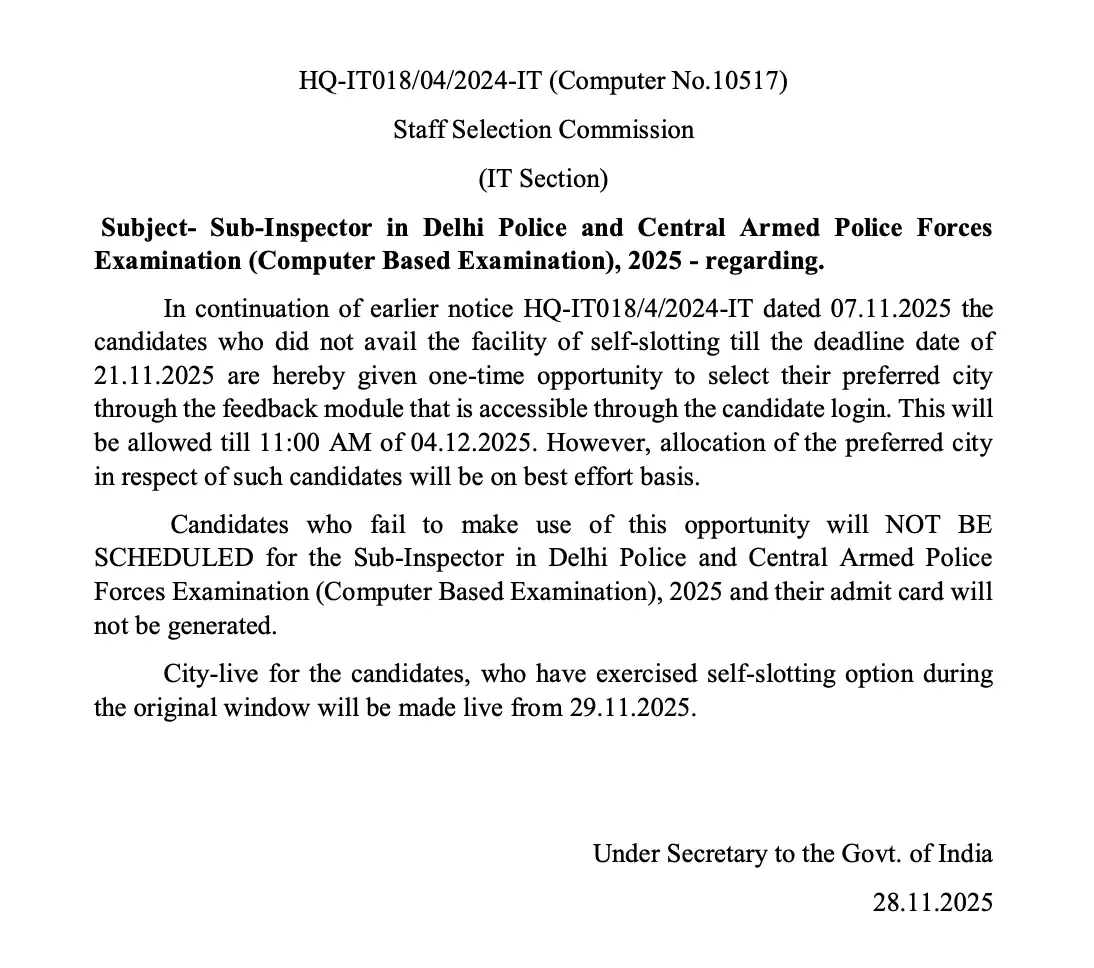
Key Timelines for SSC CPO 2025 Slot Booking
Time is of the essence for this active portal. The window to choose your preferred slots opened on November 29, 2025, and will shut down strictly on December 4, 2025, at 11:00 AM. Because slot choices cannot be changed after final submission, candidates should carefully review their schedules before completing the process on the official portal at www.ssc.gov.in.
Following the conclusion of this selection period, the official Computer-Based Test (CBT) is scheduled to be conducted from December 9 to 12, 2025. To stay updated on regional allocations and instructions, check out the latest SSC CPO City Intimation 2025 Released- Click Here to Check.
Steps for SSC CPO Exam Slot Booking 2025
To secure your preferred test timing and location without hassle, follow this step-by-step procedure:
- Visit the official website of the Staff Selection Commission (SSC) at https://ssc.gov.in
- Go to the Candidates Portal, log in using your credentials, and go to “My Application,”.
- Select an option. Click on Select City, Exam Date, and Shift.
- Select a preferred date for the examination and click Get Slot Details.
- Select slots (date and shift) for the three cities chosen during the application.
- After choosing a date and shift, confirm the choice by validating the OTP (sent to the registered mobile number or email ID).
- Click Validate & Submit to finalise.
- Once submitted, the slot, city, and shift cannot be changed under any circumstances.
Next Steps and Admit Card Information
Once you have successfully locked in your choices before the December 4 deadline, make sure to plan your travel logistics accordingly for the December 9–12 test dates. Keep an eye out for official hall tickets so you can proceed to download your credentials via the SSC CPO Admit Card 2025- Click Here to Download page as soon as they become available.
Frequently Asked Questions (FAQs)
Recommended Reads
- SSC CPO Exam City Intimation 2025 Released - Check Date & Details
- SSC CPO 2026 Exam Overview: Notification, Dates, Eligibility & Syllabus
- UPSSSC VDO Final Result 2025 Released: Cut-Off Marks & Merit List
- SSC Havaldar PET PST Date 2026 Announced: Check Schedule & Physical Standards
- UPSSSC VDO Syllabus and Exam Pattern 2026: Complete Guide
- SSC Stenographer Exam City Intimation Slip 2026: Dates, Guide & Download
CGPA to Percentage Calculator
Convert your college 10-point CGPA or SGPA to equivalent percentage using official university multiplication formulas.
Never miss another exam update!
Get the fastest exam results, recruitment news, and educational guides delivered directly to your phone.