The Uttar Pradesh Education Service Selection Commission (UPESSC) has officially published the UPTET 2026 admit card on June 30, 2026. Candidates preparing for the upcoming state-level teacher eligibility determination can now access and retrieve their hall tickets online via Click to Download UPTET Admit Card 2026 (Link Active). The examinations are scheduled to take place from July 2 to July 4, 2026, across all 75 districts of Uttar Pradesh.
Aspirants must ensure they verify all particulars printed on their admission certificates. For additional resources regarding preparation and previous years, check out UPTET Previous Year Question Papers- Click to Download and review the Check UPTET Syllabus and Exam Pattern 2026.
UPTET 2026 Examination Overview
The test will be administered offline using OMR sheets in both English and Hindi languages. Candidates can reference the complete snapshot of the examination parameters below:
| Particulars | Details |
|---|---|
| Exam Name | UPTET 2026 |
| Admit Card Release Date | 30th June 2026 (Released) |
| UPTET Exam Date 2026 | 2nd to 4th July 2026 |
| UP TET Result 2026 | August 2026 |
| Sessions | Session 1- 9:30 am to 12 noon Session 2- 2:30 pm to 5:00 pm |
| Examination Mode | Offline |
| Language of Paper | English & Hindi |
| Login Credentials | Registration ID and One-Time Password |
UPTET Shift Timings and Schedule 2026
The examinations for Paper 1 (Classes 1–5) and Paper 2 (Classes 6–8) are organized across specific shifts:
| Exam Date | Paper | Reporting Time | Shift Timings |
|---|---|---|---|
| 2nd July 2026 | Paper-2 (Class 6 to 8) | 8:45 am | 9:30 am to 12 noon |
| 2nd July 2026 | Paper-2 (Class 6 to 8) | 1:45 pm | 2:30 pm to 5 pm |
| 3rd July 2026 | Paper-2 (Class 6 to 8) | 8:45 am | 9:30 am to 12 noon |
| 3rd July 2026 | Paper-1 (Class 1 to 5) | 1:45 pm | 2:30 pm to 5 pm |
| 4th July 2026 | Paper-1 (Class 1 to 5) | 8:45 am | 9:30 am to 12 noon |
How to Download UPTET Admit Card 2026
- Visit the official website of the Uttar Pradesh Education Service Selection Commission (UPESSC) at https://www.upessc.up.gov.in/.
- Go to the Candidate Services Section and click the U.P. Teacher Eligibility Test (UPTET) link.
- Click on the UPTET Admit Card Link.
- Log in through your Registration ID and One-Time Password (used for the final registration printout).
- Enter the Captcha Code that appears on the screen.
- Click on the 'Login' button after the final submission of the data.
- Your UPTET Admit Card appears on the screen.
How to Recover Forgot Registration Number or OTP
- Click on the "Forgot Application / Forgot Password" link available on the official login page.
- A recovery window will appear prompting you to enter your accurate Name, Date of Birth, Registered Email ID, and Registered Mobile Number.
- Click Submit. Your Registration Number and a newly generated One-Time Password will be dispatched to your registered email and mobile number.
- Use these retrieved credentials to log in and download your admit card without delay.
What to Do If There Is an Error on Your UPTET Admit Card 2026
- Do not panic. Note the exact error clearly and make a copy of your original supporting document (e.g., class 10 marksheet for name/DOB, category certificate, or application form printout).
- Contact UPESSC immediately. Send an email to the official UPESSC helpdesk with your Application Number, a clear description of the error, and a scanned copy of the supporting document, or write to: U.P. Pariksha Niyamak Pradhikari, Allahabad (U.P.) via the complaint portal on the official website.
- Keep checking the official website for a corrected admit card after raising your complaint.
- On exam day (if not corrected): Carry your original identity proof, application form printout, and supporting documents. Inform the centre superintendent and invigilator before the exam starts.
How to Fill UPTET OMR Sheet 2026
- Use Blue or Black Ballpoint Pen Pencils only (gel and ink pens are not allowed). Keep at least 2 ballpoint pens.
- Fill Personal Details First: Before attempting any question, fill your Roll Number, Test Booklet Number/Code and other required fields correctly in the designated boxes on the OMR Sheet.
- Bubble Fully and Darkly: Completely and darkly shade each answer bubble.
- Fill in Only One Bubble Per Question: If more than one bubble is filled, the answer will be marked wrong. There is no negative marking.
- Don't use whitener or overwrite: Avoid white fluid, correction fluid, overwriting, and extra stray marks on the OMR sheet.
- Verification Before Submission: Ensure roll number, booklet code, and all personal details are correctly filled before submitting the OMR sheet.
- Rough Sheet Also: Submit any rough paper/scratch paper provided by the invigilator at the end of the examination.
Checklists for UPTET 2026 Candidates
Credentials Required for Download
- Registration Number
- One-Time Password
Details to Check on UPTET Admit Card
| Candidate’s Name | Candidate’s Father's Name | Date Of Birth | Exam Roll number |
| Registration No | Date Of Birth | Exam Centre City | Exam Centre Address |
| Exam Date and Time | Candidate photograph and Signature | Exam Duration | Important Instructions |
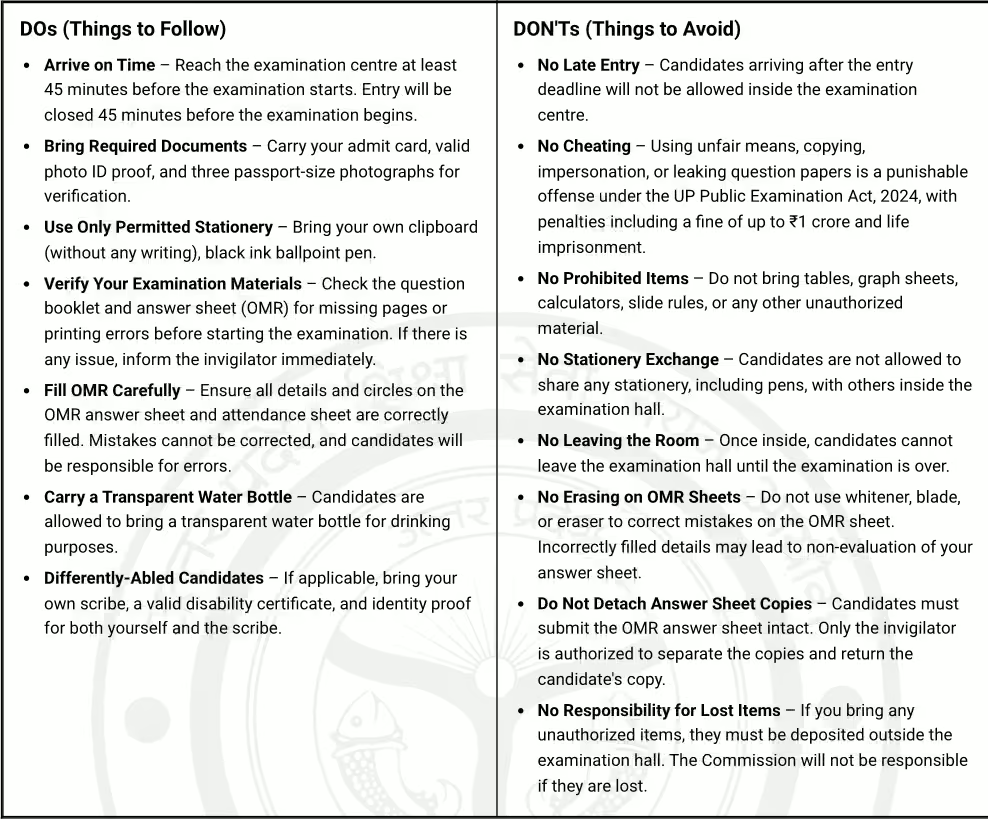
Allowed vs. Prohibited Items at Exam Center
| Allowed Items | Prohibited Items |
|---|---|
|
|
UPTET 2026 – Night Before Exam Checklist
- Print 2–3 copies of UPTET Admit Card on A4-size white paper
- Keep your original photo ID ready – Aadhaar, PAN, Voter ID, Passport, or Driving Licence
- Keep 1–2 passport-size photographs
- Pack at least 2 blue/black ballpoint pens
- Pack a transparent water bottle
- Keep a simple analogue watch
- Check the exam centre location on Google Maps
- Set multiple alarms for the next morning
- Leave your mobile phone at home or in your vehicle
- Read instructions on your admittance card
For more updates regarding exam schedules, refer to UPTET Exam Date 2026. Once evaluations are concluded, you can check scores via UP TET Result 2026 or directly track outcomes using UP TET Result 2026- Click to Check when results are announced in August 2026.
Frequently Asked Questions (FAQs)
Recommended Reads
- UPTET Answer Key 2026 Released: Direct Link, Objection Process & Dates
- UPTET 2026 Provisional Answer Key Released: Download Now & Challenge Objections
- UPTET Exam City Intimation Slip 2026 Out: Download Link & Exam Dates
- UPTET 2026 Cut Off Marks & Qualifying Standards: Complete Guide
- UPTET Certificate 2026: Validity, Qualifying Marks & Benefits
- UPTET 2026 Guidelines: Eligibility, Age Limits & Attempt Rules
Negative Marking & Net Score Calculator
Calculate your exact post-answer-key net marks after deducting 1/3rd or 1/4th negative penalty across SSC, UPSC, and State exams.
Never miss another exam update!
Get the fastest exam results, recruitment news, and educational guides delivered directly to your phone.