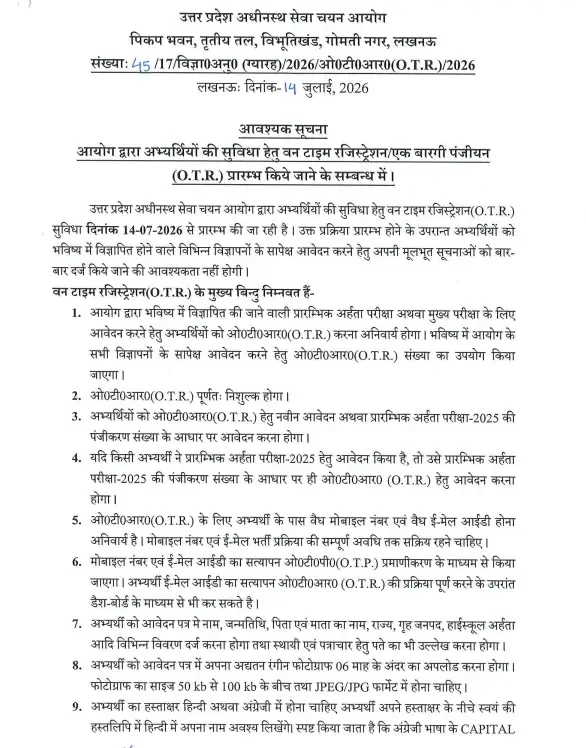
The Uttar Pradesh Subordinate Services Selection Commission (UPSSSC) has officially rolled out the centralized digital profile platform for all upcoming departmental recruitments. The UPSSSC OTR Registration 2026 Link (Active) – Click to Apply is now functional, streamlining the application journey for thousands of aspirants across the state. Operating this centralized mechanism ensures candidates no longer need to fill out their personal and educational credentials repeatedly for every new job opening.
Officially commencing on 14th July 2026, the OTR facility is provided completely free of cost. Aspirants can set up their profile either through a brand-new registration process or by mapping their registration number from the Preliminary Eligibility Test (PET) 2025. Securing a unique profile ID via this system is now a mandatory prerequisite for any future recruitment drive or PET cycle managed by the commission.
Documents Required for UPSSSC One-Time Registration (OTR) 2026
Before heading over to the portal hosted at https://upsssc.gov.in/, ensure you have gathered all necessary information and digital assets. Having these ready prevents session timeouts and formatting errors:
- An active personal mobile number and email ID
- Aadhaar number
- Class 10 / High School certificate (for basic details like DOB, roll number references)
- Educational qualification certificates
- A recent passport-size photograph and signature scan (correct pixel dimensions and file size, as specified on the portal)
Steps to Fill UPSSSC OTR Registration 2026
Follow this systematic procedure to complete your registration accurately:
- Visit the official website of the Uttar Pradesh Subordinate Services Selection Commission (UPSSSC) at upsssc.gov.in.
- Locate the “One Time Registration (OTR)” link on the homepage and click “New Registration” if this is your first time.
- Enter your basic details: name, father’s/mother’s name, date of birth, gender, category, nationality, and domicile, exactly as they appear on your official documents (Class 10 certificate, Aadhaar, etc.).
- Provide a valid, active mobile number and email ID. These are mandatory all OTPs and important communication will be sent here, so avoid using a number or email you don’t check regularly.
- Verify via OTP. An OTP is sent to your registered mobile number and email; enter it to confirm your identity.
- Set your login credentials. Choose a password you’ll remember, since the same credentials will be used to log in for every future UPSSSC application.
- Complete your profile — fill in educational qualification details, address (correspondence and permanent), and other required fields.
- Upload your photograph and signature in the prescribed format and file size specified on the portal. Blurry images or wrong dimensions are among the most common causes of rejection at this stage, so double-check before uploading.
- Review and submit. Once validated, the system generates your unique OTR ID/number.
- Download or screenshot your OTR confirmation and keep the ID safe.
Next Steps After Registration
Once you have successfully received your unique OTR ID, store your login information securely. Keep an eye out for upcoming departmental notification releases and watch for subsequent exam calendars, admit card download schedules, and specific post application links that will utilize your new digital profile.
Frequently Asked Questions (FAQs)
Recommended Reads
- UPSSSC VDO Final Result 2025 Released: Cut-Off Marks & Merit List
- UPSSSC VDO Syllabus and Exam Pattern 2026: Complete Guide
- UPSSSC AGTA Admit Card 2026 Out – Download Hall Ticket Now
- UPSSSC ASO Admit Card 2026 Released: Direct Download Link & Exam Date
- UPSSSC ASO Exam City 2026 Out: Download Mains Exam District Slip
- UPSSSC AGTA Final Result 2026 Out: Cut Off & Merit List
Age & Eligibility Calculator for Exams
Calculate your exact age in years, months, and days as on the official notification cutoff date to check eligibility.
Never miss another exam update!
Get the fastest exam results, recruitment news, and educational guides delivered directly to your phone.