The Staff Selection Commission (SSC) concludes the mandatory SSC MTS Self-Slot Booking process for the Multi-Tasking (Non-Technical) Staff and Havaldar (CBIC & CBN) Examination, 2025. Candidates appearing for this recruitment drive must lock in their preferred testing parameters immediately to ensure their participation.
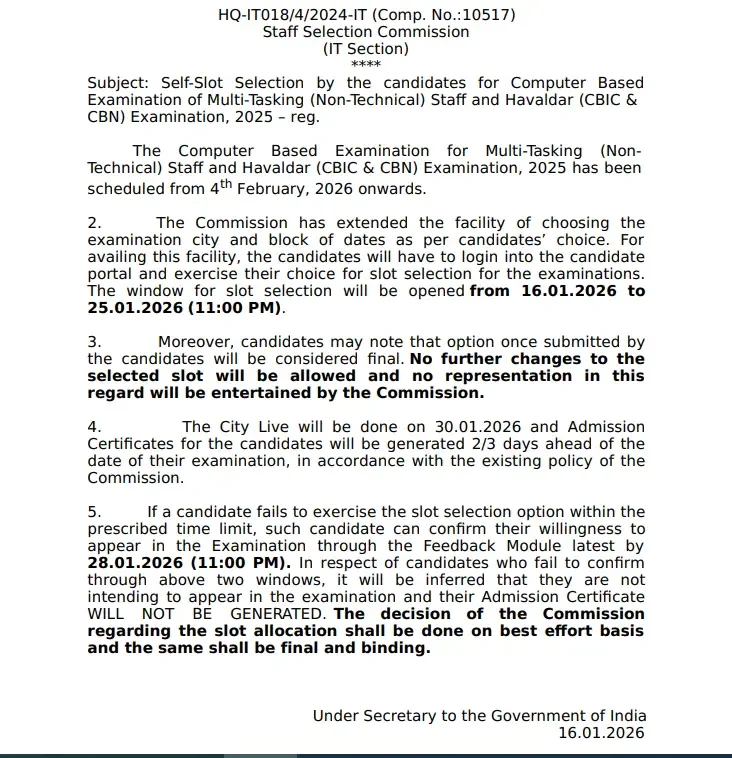
With 7,948 announced vacancies across MTS and Havaldar posts, competition is fierce, and completing this procedure on Access Official SSC MTS Slot Booking 2026 Portal (Link Active) via the official website www.ssc.gov.in is strictly required. Failure to finalize your exam date, shift, and test center will prevent the issuance of your admit card.
Important SSC MTS Examination 2025 Overview
Review the essential schedule and organizational specifications for the upcoming tests:
- Organisation: Staff Selection Commission (SSC)
- Exam Name: Multi-Tasking (Non-Technical) Staff and Havaldar (CBIC & CBN) Examination, 2025
- SSC MTS City Intimation 2026: 30th January 2026
- Portal Activation: 16th to 25th January 2026 (11 pm)
- SSC MTS Admit Card 2026: 1st February 2026
- SSC MTS Exam Date 2026: 4th February 2026 onwards
- Facility: Choose city, date, and exam shift
- Change Option: Not allowed after submission
- Language Limitation: Fewer slots for regional languages
- Official Website: www.ssc.gov.in
| Activity | Details |
|---|---|
| Organisation | Staff Selection Commission (SSC) |
| Exam Name | Multi-Tasking (Non-Technical) Staff and Havaldar (CBIC & CBN) Examination, 2025 |
| SSC MTS City Intimation 2026 | 30th January 2026 |
| Portal Activation | 16th to 25th January 2026 (11 pm) |
| SSC MTS Admit Card 2026 | 1st February 2026 |
| SSC MTS Exam Date 2026 | 4th February 2026 onwards |
| Facility | Choose city, date, and exam shift |
| Change Option | Not allowed after submission |
| Language Limitation | Fewer slots for regional languages |
| Official Website | www.ssc.gov.in |
Steps for SSC MTS Self Slot Booking 2026
Carefully follow the instructions below to secure your slots before the closure window:
- Visit the official website of the Staff Selection Commission (SSC) at www.ssc.gov.in
- Go to the Candidates Portal, log in using your credentials, and go to “My Application”.
- Select an option. Click on Select City, Exam Date, and Shift.
- Select a preferred date for the examination and click Get Slot Details.
- Select slots (date and shift) for the three cities chosen during the application.
- After choosing a date and shift, confirm the choice by validating the OTP (sent to the registered mobile number or email ID).
- Click Validate & Submit to finalise.
- Once submitted, the slot, city, and shift cannot be changed under any circumstances.
What to Do Next After Slot Selection
Once your slot booking is successfully confirmed, keep track of upcoming milestones. City intimation details release on January 30, 2026, followed by the official release of the SSC MTS Admit Card 2026: Click Here to Download Official Updates on February 1, 2026. Prepare your travel logistics and make sure to review your chosen schedule ahead of the examination commencing from February 4, 2026.
Frequently Asked Questions (FAQs)
Recommended Reads
- SSC MTS & Havaldar Examination 2026: Complete Guide to Recruitment, Exam Pattern, Syllabus & Application
- UPSSSC VDO Final Result 2025 Released: Cut-Off Marks & Merit List
- SSC Havaldar PET PST Date 2026 Announced: Check Schedule & Physical Standards
- UPSSSC VDO Syllabus and Exam Pattern 2026: Complete Guide
- SSC Stenographer Exam City Intimation Slip 2026: Dates, Guide & Download
- SSC JHT City Intimation Slip 2026: Exam Date, Download Guide
Age & Eligibility Calculator for Exams
Calculate your exact age in years, months, and days as on the official notification cutoff date to check eligibility.
Never miss another exam update!
Get the fastest exam results, recruitment news, and educational guides delivered directly to your phone.