The Staff Selection Commission has officially opened the application process for eligible graduate aspirants looking to secure prestigious positions through the SSC CGL 2026 recruitment cycle. With a massive total of 12,256 vacancies released for this period, candidates must navigate the application requirements, crucial dates, and procedural guidelines meticulously to ensure their candidature remains valid.
For comprehensive details regarding eligibility and exam structure, refer to the official SSC CGL 2026 Information Page. All submissions must be carried out digitally; offline applications are strictly barred.
Important Dates and Schedule
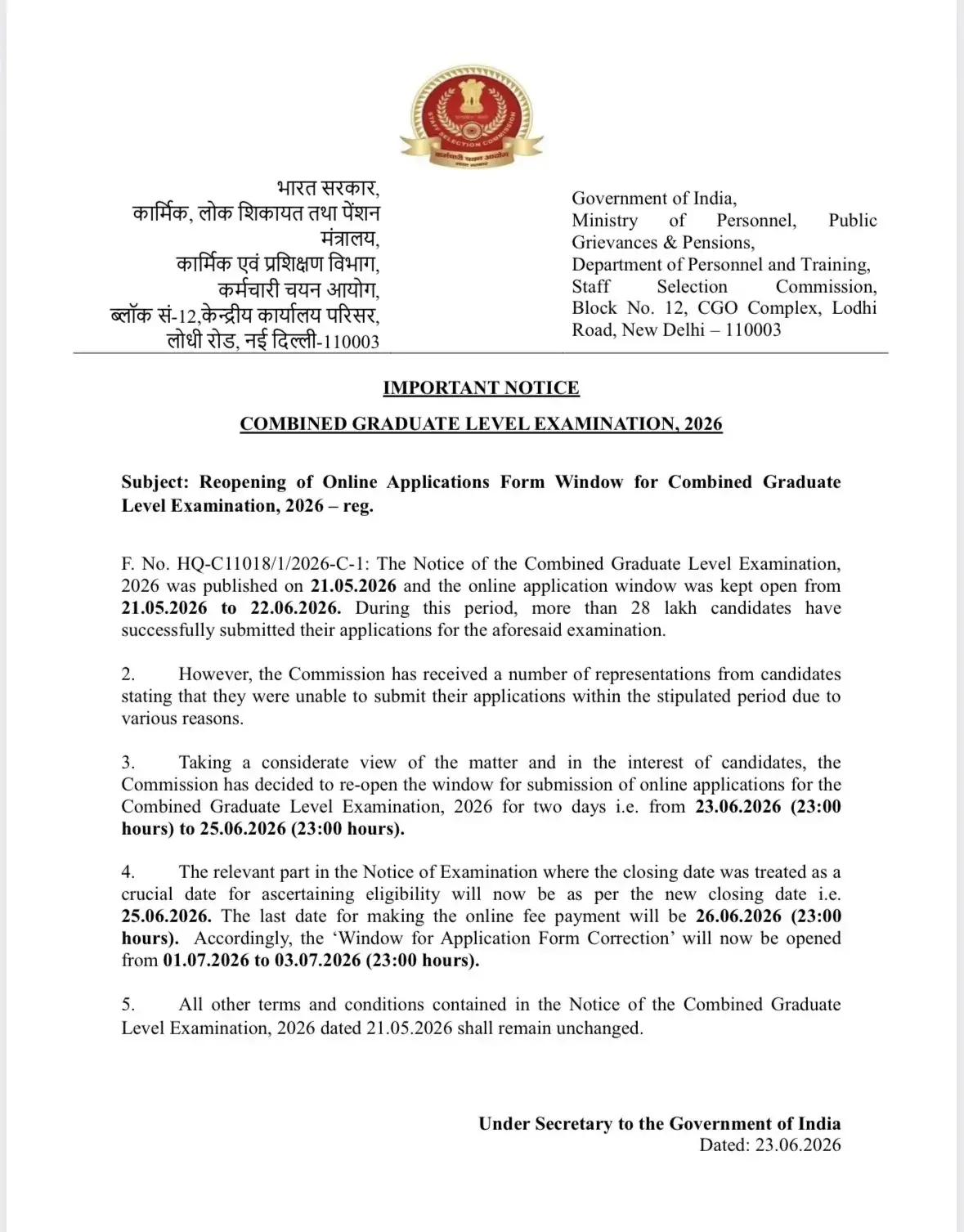
Staying updated with the recruitment timeline is essential. Below is the official schedule covering notifications, registration reopen windows, application deadlines, fee payment timelines, and correction windows.
| Activities | Dates |
|---|---|
| SSC CGL Notification & Apply Online Starts | 21st May 2026 |
| SSC CGL Apply Online Starts | 21st May 2026 |
| Window Reopen | 23rd June 2026 (11 pm) |
| Last Date to Apply | 25th June 2026 (11 pm) |
| Last Date for online fee payment | 26th June 2026 (11 pm) |
| The window for Application Form Correction | 1st to 3rd July 2026 (23:00 hours) |
| SSC CGL Exam Date 2026 | August-September 2026 |
Eligibility Criteria and Fee Structure
Candidates must satisfy the basic eligibility prerequisites before submitting their forms:
- Age Limit: 18 to 32 years (with applicable category relaxations).
- Educational Qualification: Possess a recognized bachelor's degree from a university or institution.
Application Fee Structure
| Category | Application Fee |
|---|---|
| General/ OBC | Rs. 100 |
| Female, SC, ST, PwD, & Ex-Servicemen | Nil |
Checklists for Application and Document Upload
Personal Information in OTR
| Particular | Details |
|---|---|
| Personal Information | Name Date of Birth Gender |
| Contact Details | Mobile Number Email ID |
| Educational Qualification | 10th Roll Number Board Name Passing Year |
| Photo ID Details | Aadhar Card Voter ID PAN Card Passport or any valid ID |
Upload Specifications
| Parameters | Size | Pixels |
|---|---|---|
| Photograph | 20 KB to 50 KB | 100*120 |
| Signature | 1 KB to 12 KB | 40*60 |
Editable Fields in SSC CGL Application Correction Window
- Personal Details
- Contact Details
- Educational Qualifications
- Exam Center Preferences
- Post Preferences
- Category
- Uploaded Documents
Important Points to Remember
- The application process is entirely online. No other mode of application will be accepted.
- Email ID and mobile number should be kept active for future correspondence.
- Evidence for claims made should be uploaded at the time of registration and verified at Certificate Verification and Interview.
- Candidates must fill out the complete form before the last date.
- Save the Application and Acknowledgement documents for future reference.
- Indicate order of preferences at this stage; no requests for change will be entertained.
Step-by-Step Application Instructions
Part 1. Register as a New User (One-Time Registration)
- Click the 'New User? Register Now' link on the homepage if applying for an SSC exam for the first time. For more information, visit SSC One-Time Registration (OTR).
- Complete the One-Time Registration (OTR) by providing your personal and contact details.
Part 2. SSC CGL Online Form Filling
- Return to the SSC website and log in using your Registration ID and Password. If already registered, use your existing credentials to log in.
- Click on 'Apply' appearing on the right side of the homepage. After that, click on 'Apply' in front of Combined Graduate Level Examination, 2026.
- Log in with the provided Registration ID, date of birth, and password on the page with URL SSC CGL 2026 Apply Online Link (Direct Access) - Click Here.
- Click on submit button to submit your online application form for SSC CGL after verifying details. Note down the issued Registration ID.
Part 3. Upload Documents
- Capture your photograph directly through the application portal camera following the live photo capture instructions against a white or light-colored background.
- Upload your signature written in black or blue ink on white paper adhering to JPG format, size 1 KB to 12 KB, and resolution 40x60 pixels.
- Keep other required documents ready if applicable, such as Photo ID, Caste/Category Certificate, PwBD Medical Certificate, and Ex-Servicemen Discharge documents.
Part 4. Fee Submission
- Proceed to pay the application fee.
- Pay through online mode (Debit/Credit/Net Banking/Wallet, etc.).
Next Steps After Submission
Once you have completed your online registration, fee submission, and saved your confirmation receipt, keep your credentials secure. Monitor the official portal for admit card release schedules ahead of the examination window in August-September 2026, and prepare accordingly by organizing your travel and study resources.
Frequently Asked Questions (FAQs)
Recommended Reads
- SSC CGL 2026 Notification, Vacancies, Exam Dates & Syllabus
- UPSSSC VDO Final Result 2025 Released: Cut-Off Marks & Merit List
- SSC Havaldar PET PST Date 2026 Announced: Check Schedule & Physical Standards
- UPSSSC VDO Syllabus and Exam Pattern 2026: Complete Guide
- SSC Stenographer Exam City Intimation Slip 2026: Dates, Guide & Download
- SSC JHT City Intimation Slip 2026: Exam Date, Download Guide
Passout Year & Graduation Batch Calculator
Find your official graduation passing year, academic batch label (e.g. Batch of 2023–2027), and career resume format.
Never miss another exam update!
Get the fastest exam results, recruitment news, and educational guides delivered directly to your phone.