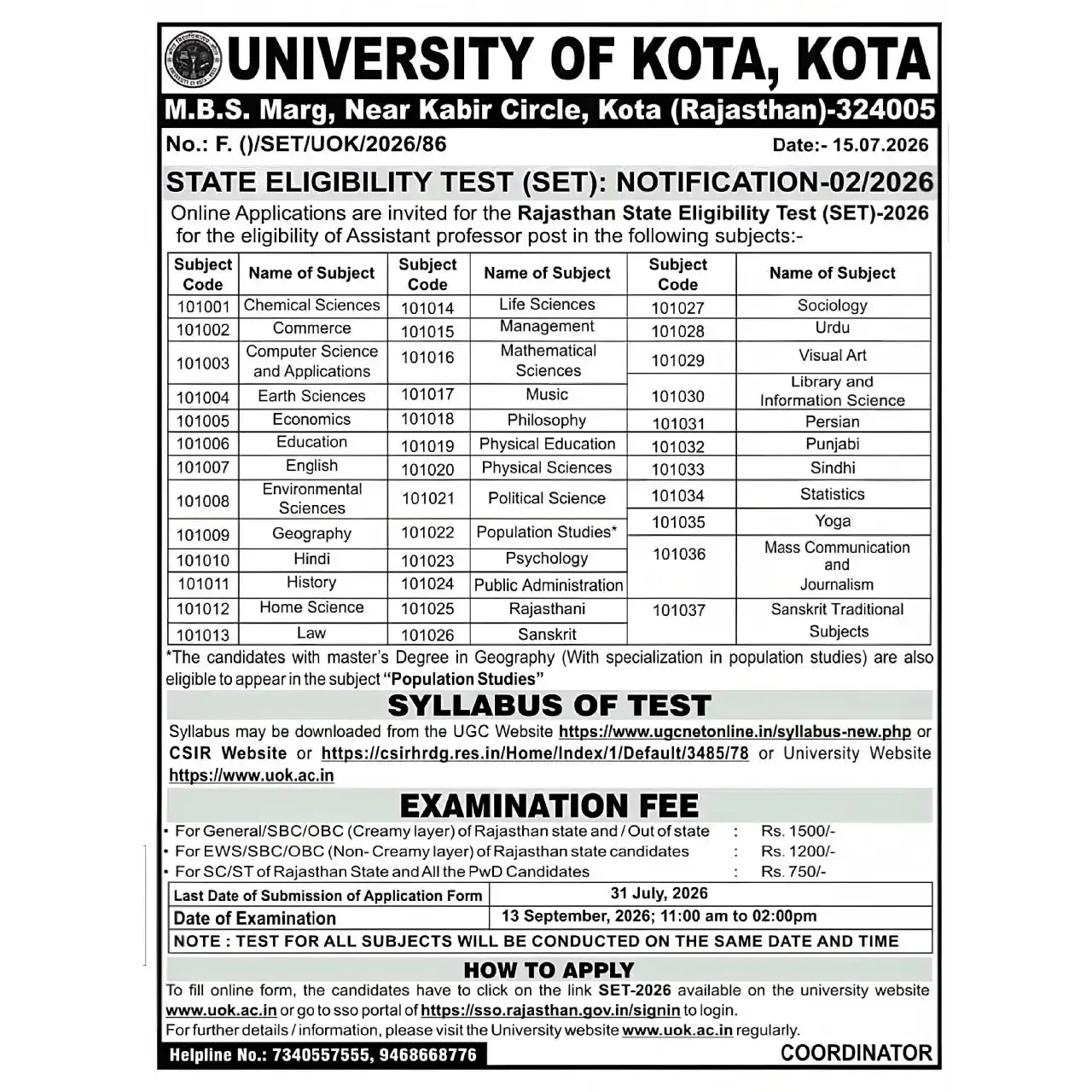
The University of Kota (UOK), the official organizing body for the Rajasthan State Eligibility Test (SET) 2026, has officially announced an extension to the application process. Candidates aspiring to qualify as Assistant Professors in universities and colleges across Rajasthan now have until 31st July 2026 to complete their registrations.
Revised Schedule for Rajasthan SET 2026
The examination, previously scheduled for earlier dates, is now confirmed to take place on 13th September 2026 (Sunday). Candidates are encouraged to align their preparation with this updated timeline. Check the Official Rajasthan SET 2026 Notification Here for comprehensive updates.
| Events | Dates |
|---|---|
| Notification Release Date | 12th June 2026 |
| Apply Online Starts | 14th June 2026 |
| Last Date to Apply Online | 31st July 2026 (EXTENDED) |
| Exam Date | 13th September 2026 (Sunday) |
Application Fee Structure
The examination fee is non-refundable and varies based on the candidate's category. Please ensure payment is completed through the Apply for Rajasthan SET 2026: Official Registration Link (Active).
| Category | Application Fee |
|---|---|
| General/SBC/OBC (CL) of Rajasthan state and / Out of state | Rs. 1500 |
| EWS/SBC/OBC (NCL) of Rajasthan state candidates | Rs. 1200 |
| SC/ST of Rajasthan State and All the PwD Candidates | Rs. 750 |
Documents Checklist
Before starting the registration, ensure you have the following information and documents ready to avoid errors during the application process.
- Required Information: Mobile number, Email ID, Aadhaar, Category certificate
- Personal Details: Name (as per 10th), DOB, Father name, Mother name, Address
- Education Details: 10th marksheet, 12th marksheet, Graduation details
- Upload Documents: Photo, Signature, Handwritten Specimen
How to Apply Online for Rajasthan SET Exam 2026
- Visit the official SSO portal at www.sso.rajasthan.gov.in.
- Click on “Register” and select the “Citizen” category.
- Register using valid login details.
- Set a secure password and note down your SSO ID carefully for future use.
- Enter your SSO ID, Password, and the on-screen Captcha.
- Go to the official Recruitment Portal: recruitment.rajasthan.gov.in
- On the Basic Page, complete the remaining mandatory fields in your profile.
- Complete the fee payment using options such as e-challan, debit card/credit card, or net banking.
- After successful payment, your OTR Profile Page will be displayed with your unique OTR Number.
- Note down your OTR Number carefully — it will be required for all future applications on this portal.
- Enter details for all applicable levels of education (Class 10th, Class 12th, Graduation, Post-Graduation, Other Qualifications).
- For each qualification, enter the marks obtained and the corresponding grades.
- Upload supporting documents for each qualification in the specified format.
- After a successful fee payment, your application form will be considered as officially submitted.
- Download and save a copy of the submitted application form and payment receipt for future reference.
Document Upload Specifications
| Document | File Format | Size |
|---|---|---|
| Handwritten Specimen | 100 KB – 200 KB | |
| Signature in Hindi | JPG / JPEG | 20 KB – 50 KB |
| Signature in English | JPG / JPEG | 20 KB – 50 KB |
| Thumb Impression | JPG / JPEG | 20 KB – 50 KB |
Once you have submitted your application, keep an eye on https://uok.ac.in/ for admit card release notifications. In the meantime, you can View the Official Rajasthan SET 2026 Syllabus and Exam Pattern or Access Rajasthan SET Previous Year Question Papers Here to refine your preparation.
Frequently Asked Questions (FAQs)
Recommended Reads
- Rajasthan SET 2026 Exam Date Announced: Check Schedule, Syllabus & Guidelines
- Rajasthan JET Result 2026 Declared: Check Scorecard & Merit Ranks
- Rajasthan Safai Karmchari Recruitment 2026: Apply for 24,712 Vacancies
- Rajasthan PTET 2026 1st Round College Allotment Released by VMOU Kota
- Rajasthan High Court Stenographer Recruitment 2026: Apply for 163 Vacancies | HCRAJ Jodhpur
- Rajasthan CET 2026 Graduation Level Exam: Notification, Dates, Eligibility & Apply Online
CGPA to Percentage Calculator
Convert your college 10-point CGPA or SGPA to equivalent percentage using official university multiplication formulas.
Never miss another exam update!
Get the fastest exam results, recruitment news, and educational guides delivered directly to your phone.