The Kerala Pareeksha Bhavan has officially released the KTET Answer Key 2026, providing candidates who appeared for the state-level examination on the 21st and 23rd of February with the opportunity to evaluate their performance. This release covers all four categories, allowing aspirants to calculate their estimated scores ahead of the final KTET Result 2026.
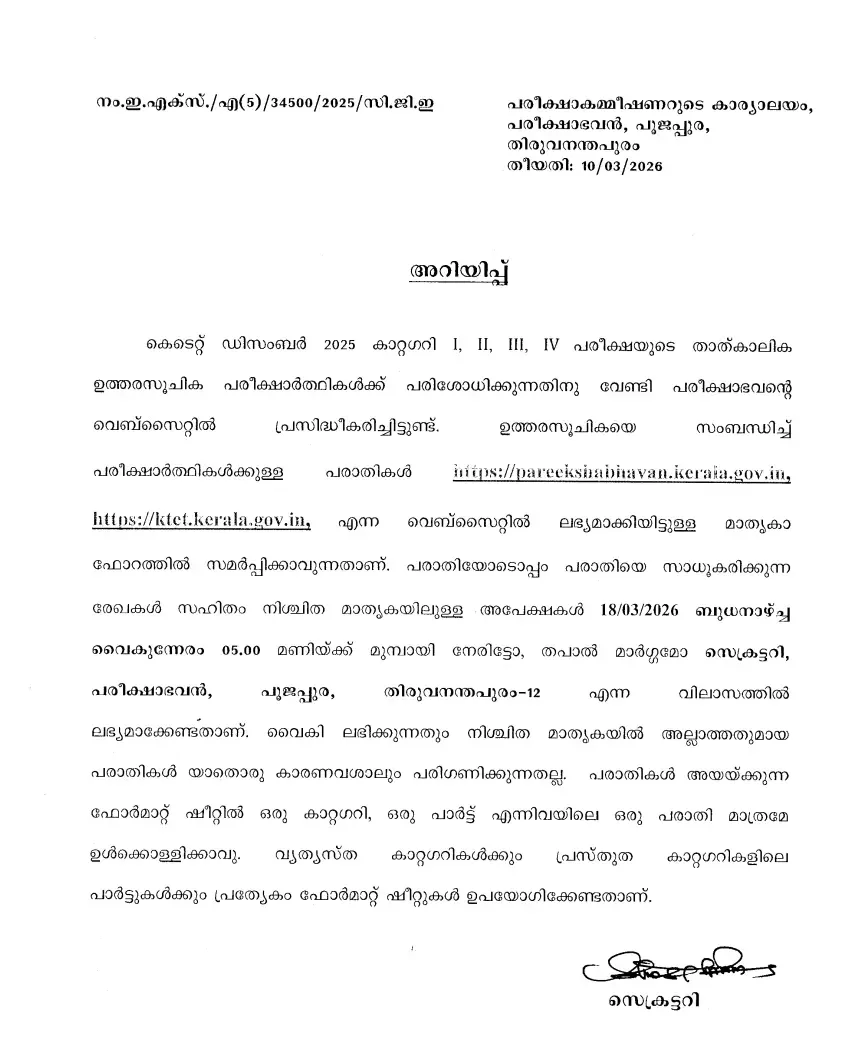
Kerala TET Answer Key 2026 Overview
Below is the summary of the examination and answer key release details:
| Parameter | Details |
|---|---|
| Organization Name | Kerala Pareeksha Bhavan |
| Exam Name | Kerala Teacher Eligibility Test (KTET) |
| Level of Exam | State |
| Mode of Answer Key | Online |
| Answer Key Release Date | 10th March 2026 |
| Raise Objection Dates | 10th to 18th March 2026 |
| KTET Result 2026 | 26th May 2026 |
| Negative Marking | Nil |
| Official Website | www.ktet.kerala.gov.in |
How to Download Answer Key for KTET
- Visit the official KPB website at www.ktet.kerala.gov.in.
- Locate the link labeled “PROVISIONAL ANSWER KEY OF K-TET FEB 2026 (For Service Teachers Only)” on the homepage and select your respective category (1, 2, 3, or 4).
- The PDF for your chosen category will appear on your screen.
- Download the file to your device and carefully cross-verify your marked responses against the official key.
| Category | Answer Key PDF |
|---|---|
| Category I | Download PDF |
| Category II | Download PDF |
| Category III | Download PDF |
| Category IV | Download PDF |
Kerala TET Exam 2026: Marking Scheme
The exam consists of 150 MCQs. Use the following breakdown to calculate your score:
| Parameters | Marks |
|---|---|
| No. of Questions | 150 |
| Each Correct Question | 1 |
| Each Incorrect Question | 0 |
| Blank Questions | No Marks Deducted |
Steps to Raise Objections
If you identify a discrepancy, you may submit an objection between 10th and 18th March 2026.
- Navigate to www.ktet.kerala.gov.in.
- Select the “KTET COMPLAINT FORM” link.
- Enter all necessary information, such as Category, Subject, Question Paper Code, and SET Code.
- Specify the question number and the paper details (Paper 1 or 2).
- Attach valid documentation or references to support your suggested correction.
- Submit the completed form directly to the Secretary of the Pareeksha Bhavan, Kerala, either in person or by post.
Frequently Asked Questions (FAQs)
Recommended Reads
- KTET Hall Ticket 2026 Released by Kerala Pareeksha Bhavan | Direct Download Link, Exam Dates & Schedule
- KTET 2026 Syllabus & Exam Pattern: Complete Guide for All Categories
- KTET Result 2026 Out: Download Scorecard & Check Qualifying Marks
- CIL MT Answer Key 2026: CBT Exam Solution PDF & Download Link
- Federal Bank Sales Officer Recruitment 2026: Apply Online for Corporate Salary Posts
- ADA Recruitment 2026: Apply for 111 Project Assistant Posts (ADV-139)
Negative Marking & Net Score Calculator
Calculate your exact post-answer-key net marks after deducting 1/3rd or 1/4th negative penalty across SSC, UPSC, and State exams.
Never miss another exam update!
Get the fastest exam results, recruitment news, and educational guides delivered directly to your phone.