The Kerala Public Service Commission (KPSC) Thulasi portal serves as the primary gateway for state government recruitment in Kerala. Through the One-Time Registration (OTR) system, candidates can register once and apply for any advertised post from 2012 onwards using the same credentials. Whether you are tracking the June–July 2026 exam schedule or setting up a brand-new profile, this comprehensive guide outlines every important detail, procedure, and update.
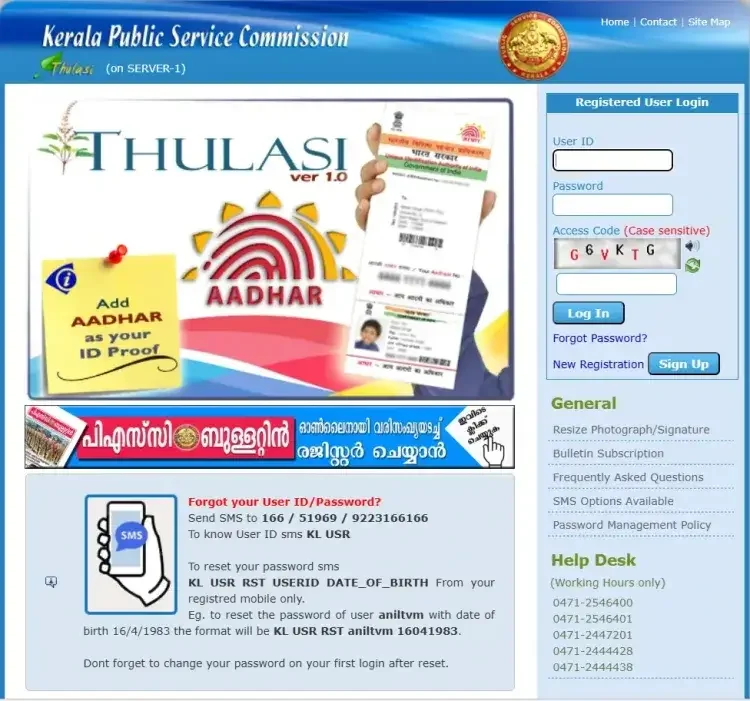
Kerala PSC Thulasi Overview Details
Before getting started, review the baseline information about the portal:
- Organization: Kerala Public Service Commission (KPSC)
- State: Kerala
- Registration Status: Active
- Registration Mode: Online
- Services Offered: Registration, Application, Admit Card, Result, Notifications
- Registration Fee: No Fee
- Registration Page: Kerala PSC Thulasi Login 2026- Click to Register
- Official Website: www.kerala.gov.in
| Topic | Details |
|---|---|
| One-Time Registration (OTR) | • Register once to apply for any post advertised from 2012 onwards. • Use the same User ID and Password for future applications, hall ticket downloads, and result checks. • No need to register again for each post. |
| Document Upload Requirements | • Photograph: 150 × 200 pixels, max 30 KB, front facial pose, light background. • Signature: 150 × 200 pixels, max 30 KB. • Use tools like MS Paint, Adobe Photoshop, or GIMP to resize images. |
| University/Subject Not Listed | • Select “University outside Kerala” and provide details in remarks. • For unlisted subjects, send feedback or select a similar subject and note in remarks. • Ongoing courses cannot be added until completed. • Deemed universities: choose “Outside State University” and provide details in remarks. |
| Eligibility Test Not Listed: | Choose the major stream (Science, Humanities, Commerce). This won’t affect eligibility. |
| How to Apply | • Go to the “Notification” menu on the official website. • Check active job notifications and follow the steps to apply online. |
| Before Applying | • Fill in educational qualifications, physical measurements (if applicable), languages known, and required declarations. • Check eligibility in the job notification: “Apply Now” if eligible. |
| After Application Submission | • Check profile for “Applied” status. • Receive SMS confirmation if a mobile number is registered. • Print the application for future reference or submission. |
Essential Documents Required for Registration
Before jumping into the registration wizard, gather the following documents and credentials:
- Recent passport-size photograph
- Scanned signature
- Email ID and mobile number for registration and OTP verification
- Aadhaar Card or any valid Photo ID proof (Voter ID, PAN, Driving License, etc.)
- SSLC / 10th certificate (for date of birth and education verification)
- Educational qualification certificates
- Community or caste certificate
- Domicile certificate (for Kerala residents)
Kerala PSC Thulasi Login Process
To access your dashboard for downloading hall tickets or reviewing notifications, follow these steps:
- Visit the Kerala PSC Thulasi official login page.
- Fill out your User ID, password, and access code.
- Click on the “Login” button.
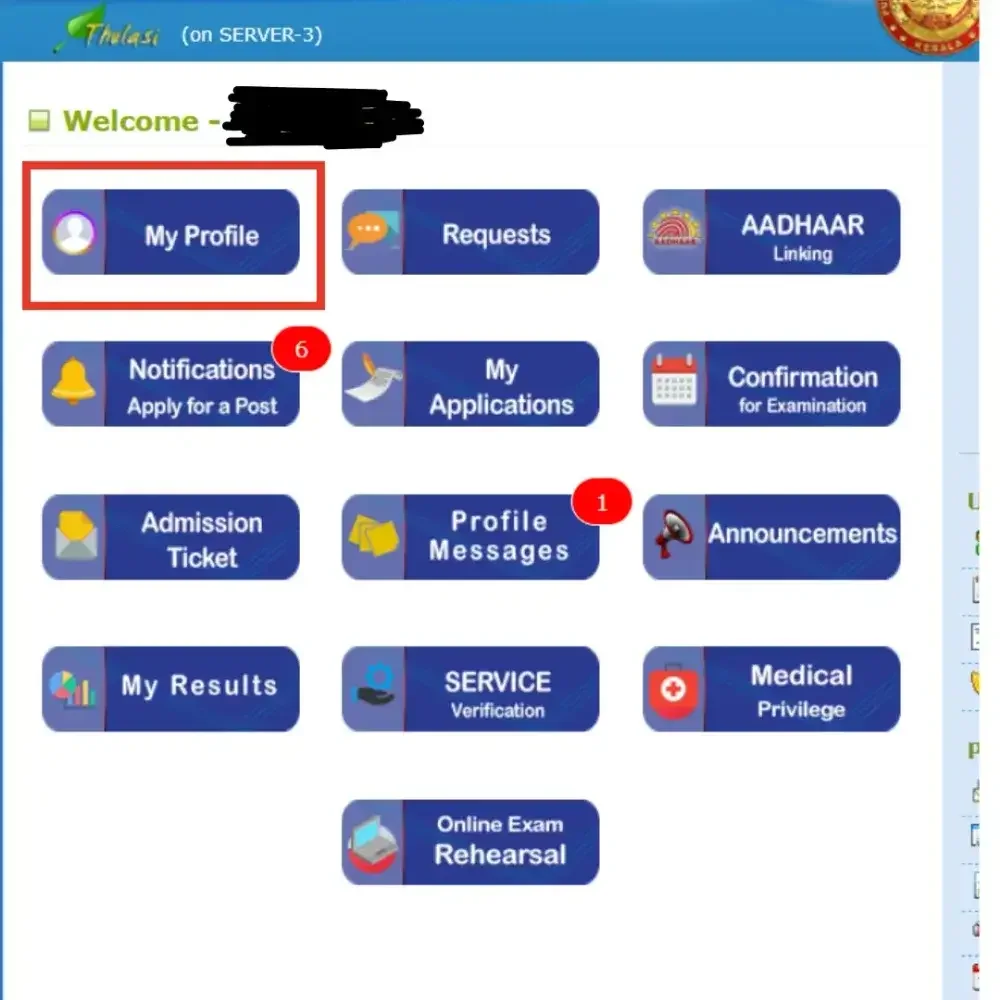
- You will be redirected to the My Profile page, where you can view and update your details.
Kerala PSC Thulsi Login New Registration
New applicants can create their OTR profile by completing the five-step process:
- Visit the official Kerala PSC Thulasi web portal: https://thulasi.psc.kerala.gov.in/thulasi/
- On the homepage, click on "New Registration".
- Filling Personal Details: Fill in the required details like Name, Date of Birth, Gender, Father Name, Mother Name, Religion, Caste, Sub Caste, ID proof etc.
- Communication Details: Mobile Number, Email and Address
- Upload Photograph: 150 × 200 pixels, maximum size 30 KB, front facial pose, light background, and a clear face.
- Upload Signature: 150 × 200 pixels, maximum size 30 KB.
- Preview and Submit: Candidates must complete all five steps to finish registration and get their unique User ID.
Forgot Password Recovery Steps
If you lose or forget your account passphrase, you can recover access easily:
- Click the “Forgot Password?” link on the registration page.
- Enter your User ID, Date of Birth, and Unique ID to reset your password.
2026 Photo & Signature Specifications
Strict quality parameters are enforced for uploaded media files:
- Photograph: Must be 150px (Width) x 200px (Height) and under 30 KB.
- Photo Text: Your name and the date the photo was taken must be printed at the bottom in black ink on a white background.
- Validity: For new registrations, the photo must be taken within the last 6 months. Once uploaded, it remains valid for 10 years.
- Signature: Must be on white paper using blue or black ink, scanned at 150px x 200px, and under 30 KB.
2026 Rule Updates & Important Notices
Keep note of critical changes implemented for recruitment cycles:
- Mandatory Aadhaar verification is required for Gazetted and Police-category posts as of 04 Jul 2026.
- The KPSC examination schedule for June–July 2026 has been published.
- A 10-year photo validity policy is strictly enforced; photos dating back to 2016 or earlier must be updated.
- The Kerala PSC Thulasi Mobile App is available for free download on the Google Play Store.
Support and Official Channels
If you encounter any technical obstacles while managing your account at https://thulasi.psc.kerala.gov.in, reach out via the official help desk numbers: 0471-2546400, 0471-2546401, 0471-2447201, 0471-2444428, 0471-2444438, or drop an email to [email protected].
Frequently Asked Questions (FAQs)
Recommended Reads
- Kerala PSC Secretariat Assistant/Auditor Syllabus & Exam Pattern 2026
- Kerala SET Answer Key 2026: Download Links, Marking Scheme & Objection Process
- Kerala University Result 2026 Declared: Check BA, BCom, BSc & MA Scores
- KTET Result 2026: Kerala TET Scorecard, Direct Link & Pareeksha Bhavan Updates
- Kerala SET Hall Ticket 2026 Released: Direct Link & Exam Schedule
- Kerala SET Result 2026: LBS Centre KSET Scorecard & Merit Details
Exam Photo & Signature Resizer (20KB - 50KB)
Resize passport photo & signature to 20-50KB with Name & Date of Photo (DOP) strip or combine them in 1-click.
Never miss another exam update!
Get the fastest exam results, recruitment news, and educational guides delivered directly to your phone.