The Jharkhand Public Service Commission (JPSC) has officially activated the gateway for candidates to secure their examination entry passes. The Jharkhand Eligibility Test (Advt. No. 08/2025) is approaching quickly, and applicants must complete their hall ticket retrieval ahead of time. This examination serves as a crucial certification milestone for aspirants pursuing Assistant Professor positions and PhD admissions across the region.
For complete guidance regarding preparation and timelines, candidates can review the JET Exam Date 2026 updates, evaluate previous structures with Access JPSC JET Question Paper 2026, check post-exam performance via Download JPSC JET Answer Key 2026, and check exam structures using View Jharkhand Eligibility Test Syllabus & Exam Pattern 2026.
Important Schedule and Timeline
The JPSC JET Admit Card 2026 was released on April 22, 2026. Applicants must download their documents before the deadline of April 26, 2026, which coincides with the offline examination date set for Sunday, April 26, 2026.
| Events | Dates |
|---|---|
| Admit Card | 22nd April 2026 (Released) |
| Last Date to Download | 26th April 2026 |
| JET Exam Date 2026 | 26th April 2026 |
JET Exam Structure & Paper Pattern
The test takes place in offline mode across five major cities in Jharkhand: Ranchi, Jamshedpur, Dhanbad, Bokaro, and Hazaribagh. The examination consists of two papers totaling 150 questions for 300 marks over a 3-hour duration, with no negative marking for incorrect attempts.
| Paper | Subjects | No. of Questions | Marks | Duration |
|---|---|---|---|---|
| Paper 1 | Teaching & Research Aptitude | 50 | 100 | 3 Hours |
| Paper 2 | Subject Specific Test | 100 | 200 | 3 Hours |
| Total | - | 150 | 300 | 3 Hours |
Steps to Download Jharkhand Eligibility Test JET Admit Card 2026
Candidates can acquire their credentials using the official link: Download JPSC JET Admit Card 2026 (Official Link Active).
- Go to the official website of JPSC, www.jpsc.gov.in.
- Click on the OTR (One Time Registration) link on the homepage, or go directly to https://jpscotr.com
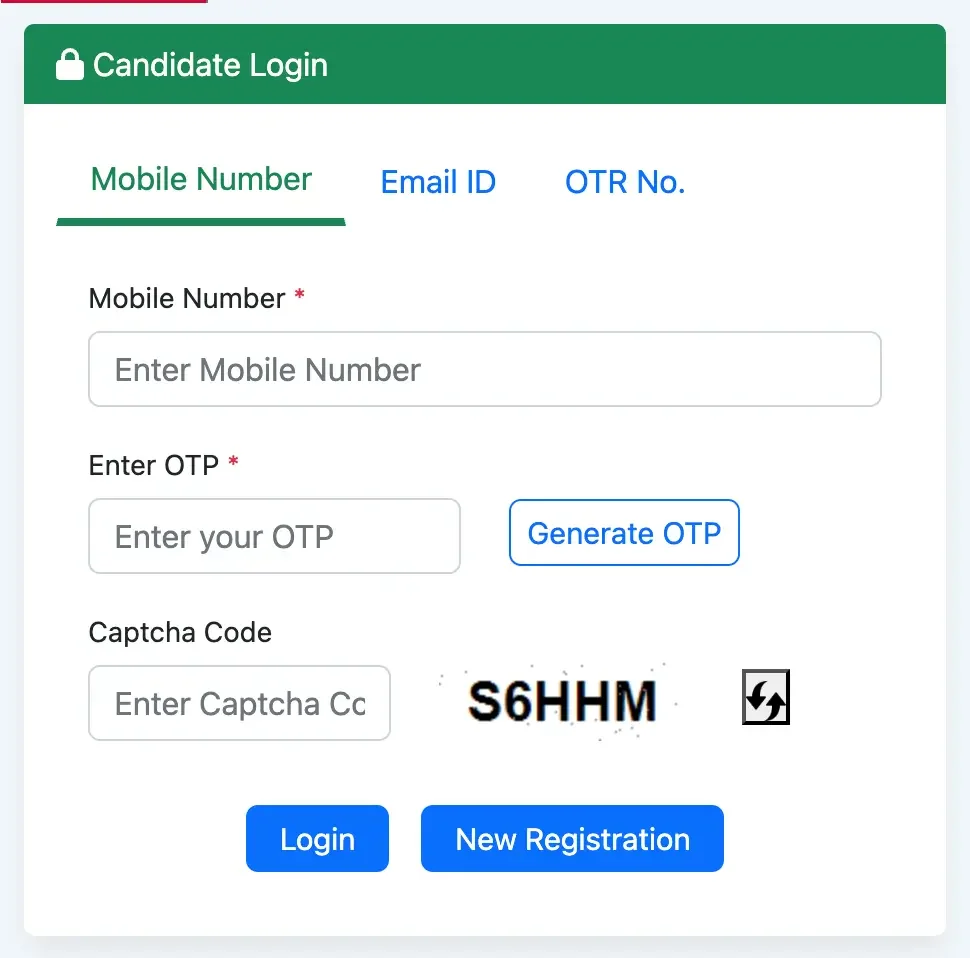
- Log in using your registered E-mail ID, mobile number, or OTR registration number along with your password.
- Candidates are redirected to the login page.
- Enter the user ID and Password and click on login.
- jpsc.gov.in admit card 2026 appears on the screen.
- Download the admit card and take a printout to appear in the written exam.
Checklists for Examination Day
Essential Credentials for Accessing Your JPSC JET Admit Card
- Mobile number/ Email ID/ OTR Number
- OTP/ Password
- Captcha Code
What Documents to Carry Along with JET Admit Card 2026?
- Printed copy of Admit card.
- 2 recent passport-size photographs.
- One valid photo ID proof.
- Additional Documents such as PWD certificate or any declaration/undertaking.
What Not to Carry to the Exam Hall?
- Electronics: Mobile phones, smartphones, calculators, tablets, pagers, Bluetooth devices, earphones, smartwatches, and digital watches.
- Study Materials: Books, notes, notebooks, and papers.
- Stationery: Pencil boxes, pouches, stencils, and geometry boxes.
- Personal Items: Bags, handbags, and purses.
- Other Items: Food items/lunch boxes, metallic items, and heavy jewelry.
- Exam Material: Do not carry the JET City Intimation Slip.
Troubleshooting Steps if JPSC JET Hall Ticket Download Link is Not Working
- Candidates should refresh the browser and try to log in after a few minutes.
- Candidates should use the official website only.
- Recheck your Registration Number and Password, as a single character mistake can prevent login access.
- Candidates must try to access after the peak hours are over, as the website may face heavy traffic after the city intimation slip is released.
- Clean your device’s browser cache and cookies if the website keeps loading.
- Ensure that you have a stable internet connection.
- Contact the JPSC helpline number if the issue remains unresolved, even after multiple attempts
Frequently Asked Questions (FAQs)
Recommended Reads
- JPSC JET 2026 Exam City Intimation Slip Released: How to Check Your Center
- JPSC JET 2026: Exam Date Rescheduled to 26th April - Complete Guide
- JET 2026: Jharkhand Eligibility Test Exam Date, Syllabus & Pattern
- Jharkhand Home Guard Recruitment 2025: Apply for 737 Vacancies Online
- Jharkhand Police Constable Recruitment 2026: Notification, Exam Pattern, & Eligibility
- Jharkhand B.Ed/M.Ed/B.P.Ed Admit Card 2026 Released: Download Now!
Negative Marking & Net Score Calculator
Calculate your exact post-answer-key net marks after deducting 1/3rd or 1/4th negative penalty across SSC, UPSC, and State exams.
Never miss another exam update!
Get the fastest exam results, recruitment news, and educational guides delivered directly to your phone.