The Institute of Banking Personnel Selection (IBPS) has officially released the IBPS SO 2026 Notification Out for 1035 Vacancies - Click to Check. To accommodate enthusiastic aspirants, the authority has extended the application deadline by 5 days. Candidates now have until 26th July 2026 to submit their applications online for participating public sector banks under CRP SPL-XVI for the 2027–28 period.
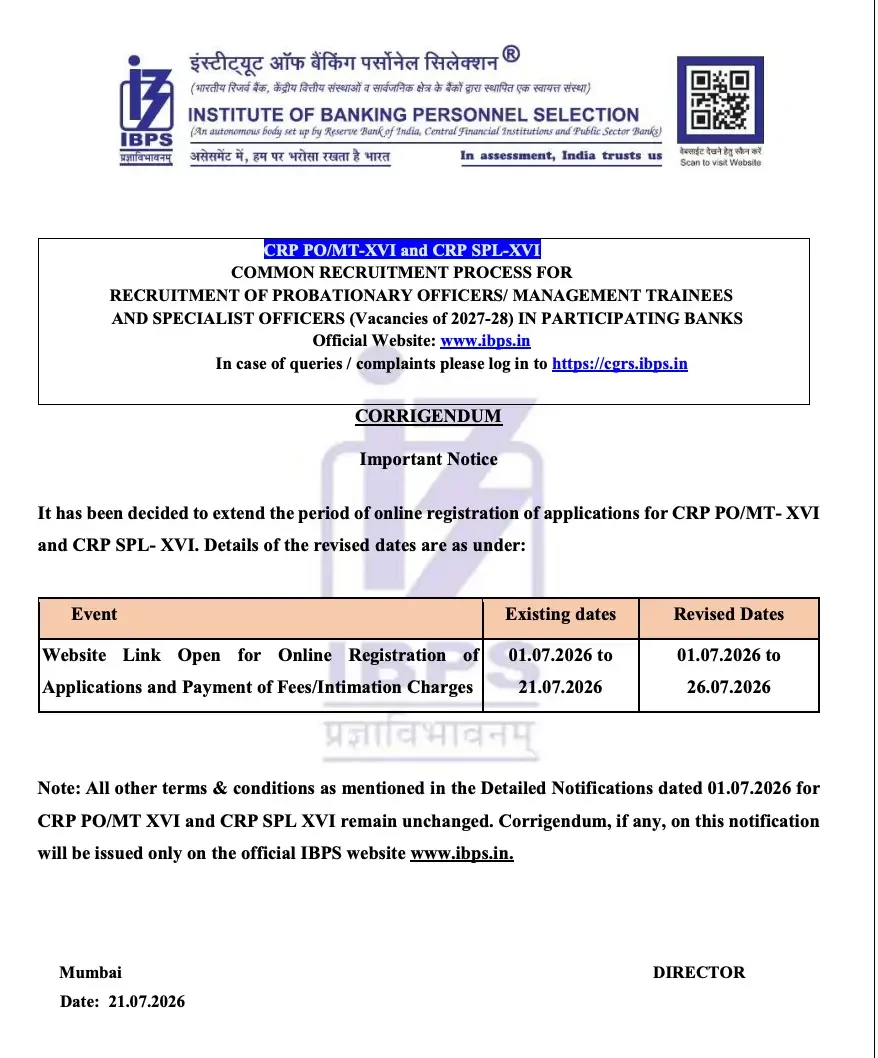
Eligible positions include IT Officer, Agriculture Officer, HR/Personnel Officer, Law Officer (Scale I), and Rajbhasha Adhikari (Scale I). Candidates can submit their applications exclusively through IBPS SO Apply Online Form 2026 Link (Active) - Click Here to Apply. Note that only candidates with successfully accepted applications are eligible to appear for the preliminary examination.
IBPS SO 2026 Important Dates & Schedule
Review the critical milestones and schedule for the recruitment process below:
| Activity | Dates |
|---|---|
| IBPS SO Notification 2026 | 1st July 2026 |
| Online Registration Starts From | 1st July 2026 |
| Last Date to Apply Online | 26th July 2026 |
| Payment of Application Fees/Intimation Charges (Online) | 26th July 2026 |
| IBPS PO & SO Application Correction Window 2026 | 29th and 30th July 2026 |
| Printing Application Form | 5th August 2026 |
| Commencement of Preliminary Exam | 29th August 2026 |
| Commencement of Mains Exam | 1st November 2026 |
If you need to make updates later, you can access the IBPS PO & SO Application Correction Window 2026 Opens - Click Here during the scheduled dates.
Application Fee Structure
The application fee varies by category as outlined below:
| Category | Application Fee |
|---|---|
| General & OBC | Rs. 850/– |
| SC/ST/PWD category | Rs. 175/- |
Document Specifications & Guidelines
Candidates must upload scanned files according to the strict dimensions and file sizes listed below:
| Documents | Dimensions | File Size |
|---|---|---|
| Passport-size Photograph | 200 x 230 pixels | 20 – 50 KBs |
| Signature | 140 x 60 pixels | 20 – 50 KBs |
| Left thumb impression | 240 x 240 pixels | 20 – 50 KBs |
Pre-Requisites of IBPS SO Online Application
- A photograph and signature scanned and ready in the prescribed format (signature must not be in capital letters).
- All necessary educational and category documents ready at the time of online payment.
- A valid, active email ID and mobile number for registration.
- Left thumb impression (or alternate finger/hand/toe impression as specified in the notification, if unavailable).
Common Mistakes to Avoid While Filling IBPS SO Application Form 2026
- Signing in capital letters (not accepted).
- Selecting the wrong post preference and being unable to correct it after the Edit Window closes.
- Uploading photographs/signatures that don't match the prescribed dimensions.
- Waiting until the last day to apply, risking payment failures or server downtime.
- Providing an inactive or incorrect email ID/mobile number, which are used for all future communication.
How to Apply online for IBPS SO Online Application 2026
- Click on the NEW REGISTRATION button on the top most right corner of the home page
- Start your application process by providing the basic details such as name, contact number, email ID, address, etc., and click on the save and next button.
- Upload your photograph and signature in the required format. The permissible size of the photograph must be 4.5 cm * 3.5 cm, and the photograph must be of passport size. Both the photograph and the signature must be clear and legible. The permissible file size of the photograph must be a minimum of 20 KB and a maximum of 50 KB and that of the signature must be a minimum of 10 KB and a maximum of 20 KB.
- Next, fill in your academic details and professional qualifications. Click on the save and the next button after filling in the details.
- Preview your application form one last time, as you won’t be allowed to make any changes further. Click on save and the next button after previewing your Application Form.
- Pay your Application Fee through the online payment option, i.e., through a credit card/debit card/net banking.
- Click on the Final Submit Button. Your application form will be submitted successfully. You will be sent an email as well as a text message with your registration ID and password by IBPS for further login into the official website.
For further details regarding corrections, refer to the IBPS PO & SO Application Correction Window 2026 guidelines. Once the exam draws closer, remember to check out the IBPS SO Admit Card 2026 - Click to Download for hall ticket updates.
Frequently Asked Questions (FAQs)
Recommended Reads
- IBPS SO 2026 Notification: 1,035 Specialist Officer Vacancies, Exam Dates & Complete Guide
- IBPS PO Exam Centre List 2026: Prelims & Mains Test Cities
- IBPS Clerk vs IBPS PO: Comprehensive Comparison of Exam, Salary & Career
- IBPS Clerk Bank Preference List 2026: Top Choices & 11 Participating Banks
- IBPS Clerk 2026 Notification Out: 11,403 Vacancies, Dates & Bank List
- SBI Clerk vs IBPS Clerk 2026: Salary, Job Profile, Work Pressure & Career Growth
Exam Photo & Signature Resizer (20KB - 50KB)
Resize passport photo & signature to 20-50KB with Name & Date of Photo (DOP) strip or combine them in 1-click.
Never miss another exam update!
Get the fastest exam results, recruitment news, and educational guides delivered directly to your phone.