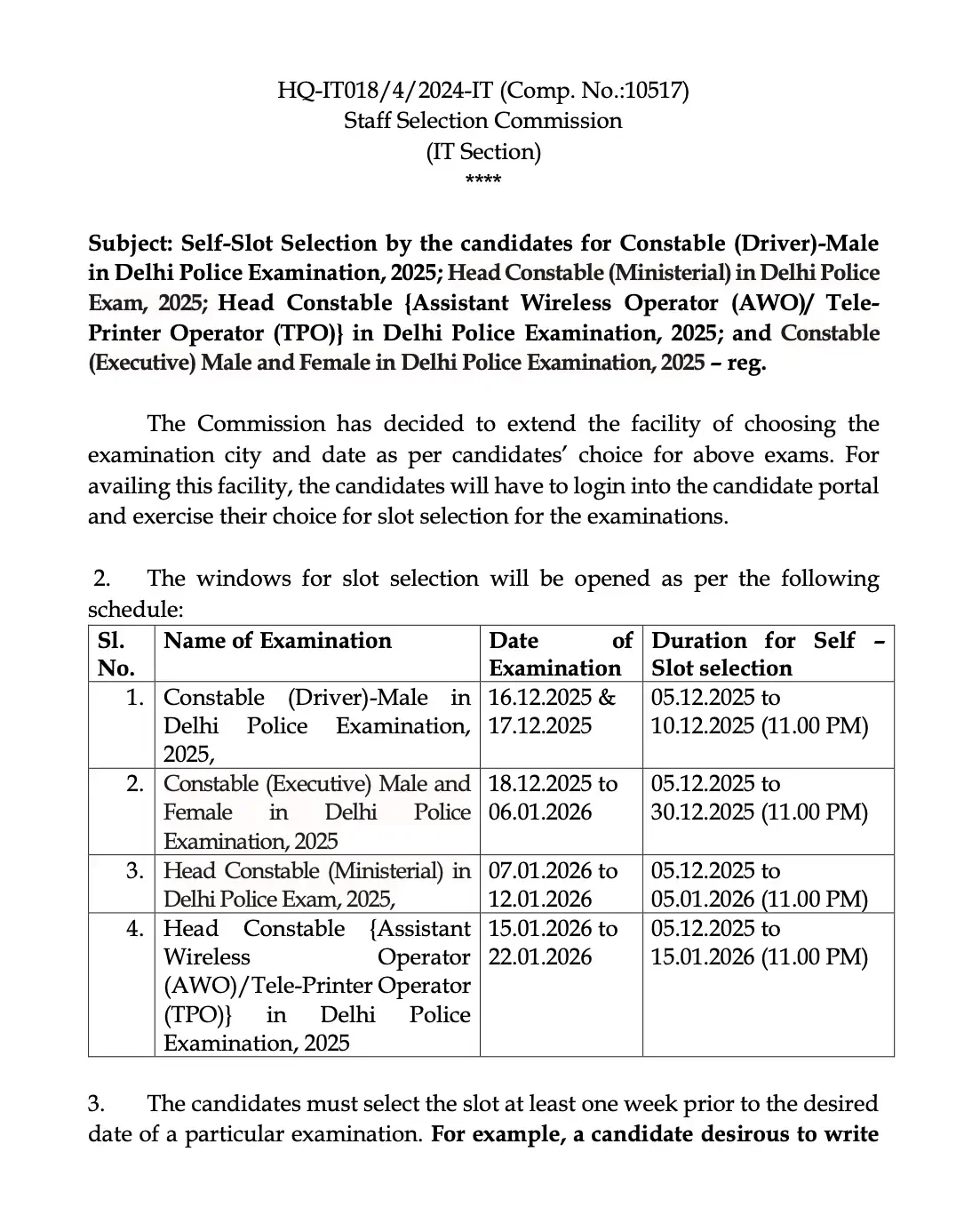
The Staff Selection Commission (SSC) has officially activated the Delhi Police Driver Slot Selection 2025 portal. Candidates preparing for the recruitment of 737 Male vacancies are now required to choose their preferred examination city, date, and shift. This time-sensitive process is a crucial step before the upcoming computer-based examination.
Key Examination Timeline
Candidates must act quickly, as the window for slot selection is open from 5th to 10th December 2025, closing strictly at 11:00 PM. Please refer to the table below for a summary of the essential dates and details regarding the recruitment process.
| Activity | Details |
|---|---|
| Organization | Staff Selection Commission (SSC) |
| Exam Name | Delhi Police Driver 2025 (Male) |
| Vacancies | 737 |
| Slot Selection Window | 5th to 10th December 2025 |
| Delhi Police Driver City Intimation 2025 | by 6th December 2025 |
| Delhi Police Driver Admit Card 2025 | By 12th December 2025 |
| Delhi Police Driver Exam Date 2025 | 16th and 17th December 2025 |
| Facility | Choose city, date, and exam shift |
| Change Option | Not allowed after submission |
| Language Limitation | Fewer slots for regional languages |
| Official Website | www.ssc.gov.in |
Steps for Delhi Police Driver Slot Selection 2025
Follow these steps carefully to complete your slot booking process. Please note that once a selection is submitted, changes are not permitted.
- Visit the official website of the Staff Selection Commission, www.ssc.gov.in.
- Log in using your credentials, and go to “My Application”.
- Click on Select City, Exam Date, and Shift.
- Read the guidelines carefully before proceeding to the Delhi Police Driver Slot Selection 2025.
- Select a preferred exam date and click "Get Slot Details". The system will display available slots for the three cities chosen during the application.
- If slots are available, select the shift marked with a green “Select” symbol. If “Not Available” appears, choose an alternative date or city.
- Confirm your choice by entering the OTP sent to your registered mobile number or email ID and click “Validate”.
Official Portal Access:
Delhi Police Driver Slot Selection 2025 (Link Active)Related Resources & Important Links
Stay updated on your recruitment journey with these additional resources:
- Delhi Police Driver City Intimation 2025
- Delhi Police Driver Admit Card 2025
- Delhi Police Driver Exam Date 2025
- Delhi Police Constable Slot Selection 2025 Link- Click to Check
- Delhi Police Head Constable Slot Selection 2025 Link- Click to Check
- Delhi Police AWO TPO Slot Selection 2025 Link- Click to Check
Frequently Asked Questions (FAQs)
Recommended Reads
- Delhi Police Driver (Male) Exam 2025: Exam Dates, Admit Card Updates & Process
- Delhi Police Driver Answer Key 2025 Released by SSC: Download Response Sheet
- Delhi Police Constable (Driver) Cut Off 2026: Official Results & Merit List Details
- SSC Delhi Police Driver Recruitment 2026: Syllabus, Exam Pattern & Selection Process
- Delhi Police Driver Recruitment 2025: Exam Details, PE&MT Schedule, and Selection Guide
- Delhi Police Driver Result 2026 Out: Download Scorecards & Next Steps
- Delhi Police Driver Admit Card 2025 Out: Download Hall Ticket & Exam Schedule
- Delhi Police Driver Answer Key 2025 Released: Check CBT Response Sheet & Raise Objections
Age & Eligibility Calculator for Exams
Calculate your exact age in years, months, and days as on the official notification cutoff date to check eligibility.
Never miss another exam update!
Get the fastest exam results, recruitment news, and educational guides delivered directly to your phone.