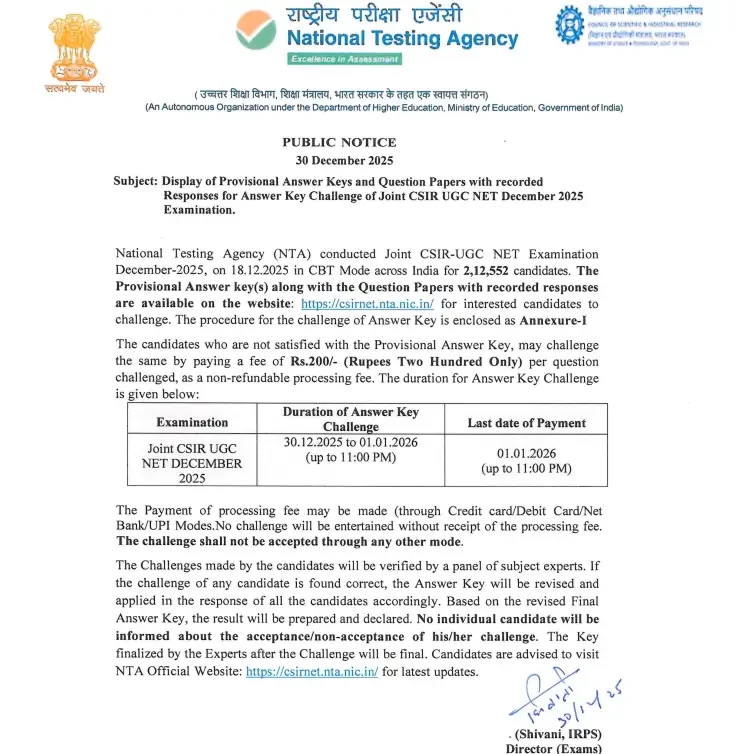
The National Testing Agency (NTA) has officially released the computer-based Joint CSIR UGC NET December 2025 answer keys along with candidate response sheets. Over 212,552 aspirants who took part in the test held on 18th December 2025 can now evaluate their performance, compute provisional scores, and submit challenges if they spot discrepancies.
To make the most of this phase, candidates should thoroughly analyze their marks using the official grading matrix. For additional reference regarding future preparations, you can View CSIR UGC NET Syllabus 2025 and Understand CSIR NET Exam Pattern 2025.
CSIR NET December Answer Key 2025 Highlight
- Conducting Body: National Testing Agency (NTA)
- Exam Name: CSIR UGC NET December 2025
- Post Name: Junior Fellowship (JRF), Lectureship/Assistant Professor, and Ph.D.
- Mode of Answer Key: Online
- Answer Key Release Date: 30th December 2025
- Raise Objections: 30th December 2025 to 1st January 2026 (11 pm)
- Exam Date: 18th December 2025
- Official Website: www.csirnet.nta.ac.in
Overview Table
| CSIR NET December Answer Key 2025 Highlight | |
| Conducting Body | National Testing Agency (NTA) |
| Exam Name | CSIR UGC NET December 2025 |
| Post Name | Junior Fellowship (JRF), Lectureship/Assistant Professor, and Ph.D. |
| Mode of Answer Key | Online |
| Answer Key Release Date | 30th December 2025 |
| Raise Objections | 30th December 2025 to 1st January 2026 (11 pm) |
| Exam Date | 18th December 2025 |
| Marking Scheme | • Each correct answer in Part A and Part B is awarded 2 marks, while in Part C, correct answers are awarded 4 marks. • There is negative marking for incorrect answers in all parts, with a deduction of 25% of the allotted marks for each wrong answer. |
| Official Website | www.csirnet.nta.ac.in |
Subject-Wise Marking Scheme and Negative Marking
General rules prescribe that Part A and Part B award 2 marks for correct answers, while Part C awards 4 marks, with specific variations per subject:
| Subjects and Parts | Marks Allotted For Each Question | Negative Marking |
|---|---|---|
| Chemical Science | ||
| A | + 2 | – 0.5 |
| B | + 2 | – 0.5 |
| C | + 4 | – 1 |
| Earth Science | ||
| A | + 2 | – 0.5 |
| B | + 2 | – 0.5 |
| C | + 4 | – 1.32 |
| Life Science | ||
| A | + 2 | – 0.5 |
| B | + 2 | – 0.5 |
| C | + 4 | – 1 |
| Mathematical Science | ||
| A | + 2 | – 0.5 |
| B | + 3 | – 0.75 |
| C | + 4.75 | 0 |
| Physical Science | ||
| A | + 2 | – 0.5 |
| B | + 3.5 | – 0.875 |
| C | + 5 | – 1.75 |
Steps to download the CSIR NET Answer Key 2025
- Visit the official website of the National Testing Agency (NTA) at www.csirnet.nta.nic.in.
- On the homepage, look for the “Latest News” section.
- Candidates find a link to download the “Joint CSIR NET December 2025 – Click Here to Answer Key Challenge.” Click on that link.
- Candidates are redirected to a new page. Here, candidates need to log in by entering their application number and date of birth.
- Enter the Security Pin as shown in the image and click on the Submit tab.
- After successfully logging in, the answer key appears on the screen.
- Download the answer key and calculate your estimated score.
You can also use the direct portal option: Download CSIR NET Answer Key 2025 – Direct Link Active.
Steps to Raise Objections to CSIR NET December Answer Key 2025
- Go to the official website National Testing Agency (NTA) at https://csirnet.nta.ac.in.
- Click on the link that reads “Joint CSIR UGC NET Answer Key Challenge Open Click Here.”
- A new login page appears on the screen. Enter your Application Number and Password, enter your Security PIN as displayed, then click on the submit button.
- Click on “View Question Paper” for marked responses and to view or challenge the Answer keys. Click on the link “Click to view /Challenge Answer Key”.
- You will see Question IDs in sequential order.
- The ID next to the question under the column ‘Correct Option(s)’ stands for the correct Answer Key to be used by NTA.
- If candidates want to challenge this option, they may use any one or more of the Option IDs given in the next four columns by clicking the check box.
- After clicking your desired option, scroll down, ‘Save your Claims’ and move to next screen.
- You will see a display of all the Option IDs you have challenged.
- You may want to upload supporting documents in which you can select ‘Choose File’ and upload (all documents are to be put in a single PDF file only).
- Click on ‘Save your Claims and pay fee’ or in case to modify the claims, click on ‘Modify your Claims’.
- After saving the claims, you will find a screen displaying your challenges.
- Kindly pay the fee by clicking on ‘Pay Fee’. The claims will be saved finally after successful payment of a required fee.
- Select Mode of Payment and Pay a non-refundable processing fee of Rs. 200/- for each question challenged.
To submit challenges directly, use the link: Click Here to File an Objection.
If you encounter any formatting or response sheet discrepancies, you may also report them via: Found Discrepancies? Share Your CSIR NET Response Sheet Here.
What to Do Next?
Once you have calculated your estimated score using the provisional keys and filed any valid objections before the 1st January 2026 deadline, keep a close watch on the official website for final results announcements. You can bookmark and track updates directly through Check CSIR NET Result 2026 – Official Link.
Frequently Asked Questions (FAQs)
Recommended Reads
- CSIR NET December 2025 Registration Deadline: Apply Before Oct 27
- CSIR NET December 2025 Notification Released: Check Exam Dates, Eligibility & Apply Online
- CSIR NET June 2026: Exam Dates, Application, Pattern & Eligibility
- CSIR UGC NET June 2026: Exam Dates, Timings, Structure & Answer Key Overview
- CSIR NET Admit Card 2026 Released by NTA: Download Link & Exam Schedule
- CSIR NET City Intimation Slip 2026 Out - Download Advance Exam City Slip
Negative Marking & Net Score Calculator
Calculate your exact post-answer-key net marks after deducting 1/3rd or 1/4th negative penalty across SSC, UPSC, and State exams.
Never miss another exam update!
Get the fastest exam results, recruitment news, and educational guides delivered directly to your phone.