The Bihar Public Service Commission (BPSC) has officially published the BPSC APO Admit Card 2026 on 9th July 2026. Candidates preparing for the upcoming Assistant Prosecution Officer preliminary examination can now access their hall tickets via the official portal. This recruitment drive aims to fill 300 Assistant Prosecution Officer vacancies under Advt. No. 13/2026. The offline examination is scheduled to take place on 15th July 2026 (Wednesday), and applicants must download their call letters before the final deadline.
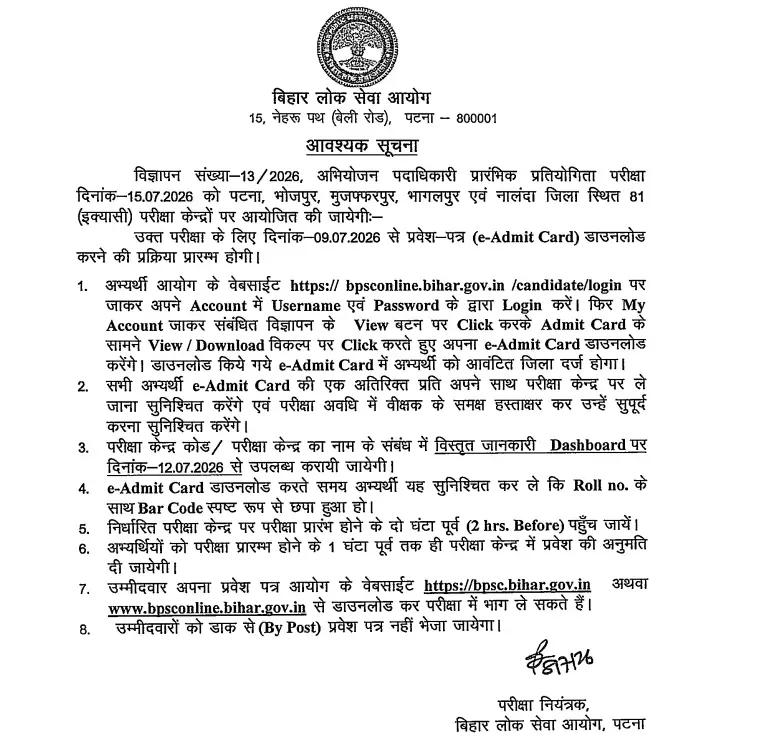
To access the direct portal link for downloading your hall ticket, visit BPSC APO Prelims Admit Card 2026 Link (Active) – Click Here to Download. Ensure you keep your Registered Email/Mobile/Username and Password ready for a smooth login experience.
BPSC Assistant Prosecution Officer Admit Card 2026: Overview
Review the key highlights of the recruitment process and examination schedule:
| Particulars | Details |
|---|---|
| Advt. No. | 13/2026 |
| Mode of Admit Card | Online |
| Admit Card release date | 9th July 2026 (Released) |
| Last Date to download the admit card | 15th July 2026 |
| Exam Date | 15th July 2026 (Wednesday) |
| Login Details | Registered Email/Mobile/Username Password |
| Mode of Exam | Offline |
| Shift TImings | 10 am to 12 noon 2:30 am to 4:30 am |
BPSC APO Exam Schedule & Shift Timings
The preliminary exam features two papers: Paper 1 (General Studies) and Paper 2 (Law). The test will be hosted across 81 centres in regions including Patna, Bhojpur, Muzaffarpur, Bhagalpur, and Nalanda.
| Paper | Shift | Reporting Timing | Exam Timing |
|---|---|---|---|
| General Studies | Shift 1 | 8 am | 10 am to 12 noon |
| Law Subject | Shift 2 | 12:30 am | 2:30 am to 4:30 am |
How to Download BPSC APO Admit Card 2026
Follow these simple steps to acquire your hall ticket smoothly:
- Go to the official website of the Bihar Public Service Commission (BPSC) at www.bpsc.bih.nic.in.
- On the home page, click the “Download Hall Ticket for BPSC Assistant Prosecution Officer (APO) Preliminary Competitive Examination” link.
- Enter your login details, i.e., Registered Email/Mobile/Username and Password.
- Once you have accurately entered all the required information, look for a button that may say “Login”.
- The admit card along with all exam details appears on the screen.
- Download and take a printout of your admit card for exam reference.
Essential Tips for Downloading Your BPSC Admit Card
- Ensure you have a stable and secure internet connection to prevent download interruptions.
- Use updated web browsers like Google Chrome or Mozilla Firefox for a smoother experience.
- Keep your application login credentials readily available.
- Verify that all printed information is accurate; report any discrepancies immediately to the authorities.
- Print at least 1-2 hard copies of your hall ticket for exam day safety.
Details Mentioned in BPSC Assistant Prosecution Officer Admit Card 2026
- Candidate’s Name and Photograph
- Roll Number and Registration/Enrollment Number
- Exam Date, Shift, and Reporting Time
- Exam Centre Name and Complete Address
- Candidate’s Photograph and Signature
- Important Instructions for Candidates
Items to be Carried to the BPSC Assistant Prosecution Officer Exam Centre
- Hard Copy of BPSC APO Admit Card
- 2 clear passport-sized photographs
- Any one valid ID proof (Aadhaar Card, Passport, Driving licence, PAN Card, Any other document issued by the government)
Things Prohibited at the BPSC APO Exam Centre
- Any textbooks, notebooks, or any study material
- Mobile phones, smartwatches, fitness bands
- Bluetooth devices
- Calculators
- Digital watches
- Electronic gadgets
- Bags, wallets, or purses
- Geometry boxes, pencil boxes or pouches
BPSC APO Exam Day Instructions & Next Steps
- Carry All Required Documents – Candidates must carry printcopy of the admit card along with a valid photo ID like Aadhaar, PAN, or Voter ID
- Arrive Early – Candidates should reach the exam venue at the reporting time to complete all exam formalities on time
- Avoid Prohibited Items – Do not carry mobile phones, calculators, or smartwatches
- Stay Calm and Focused – Stay positive, manage time well, and focus during the exam
- Follow Guidelines – Follow dress code and all exam instructions properly
After successfully downloading your hall ticket, verify all details carefully. If you encounter any issues or discrepancies, you can reach out to the BPSC help desk helpline numbers at 9297739013, 8235422948, and 8235422867 (available Monday to Friday during working hours and working days only).
Frequently Asked Questions (FAQs)
Recommended Reads
- BPSC TRE 4.0 2026: Major Changes, Exam Pattern, and Vacancy Details
- BPSC Teacher Salary 2026: Pay Scale, Allowances & In-Hand Structure
- BPSC Teacher 11-12 Chemistry Syllabus & Exam Pattern 2026: Prelims & Mains
- BPSC Teacher Exam 2026: Classes 11-12 Physics Syllabus & Exam Pattern
- Bihar Teacher Vacancy 2026: 32,388 Posts Announced via BPSC TRE 4.0
- BPSC 72nd Exam 2026 Postponed: Check Details & New Schedule Updates
Exam Photo & Signature Resizer (20KB - 50KB)
Resize passport photo & signature to 20-50KB with Name & Date of Photo (DOP) strip or combine them in 1-click.
Never miss another exam update!
Get the fastest exam results, recruitment news, and educational guides delivered directly to your phone.