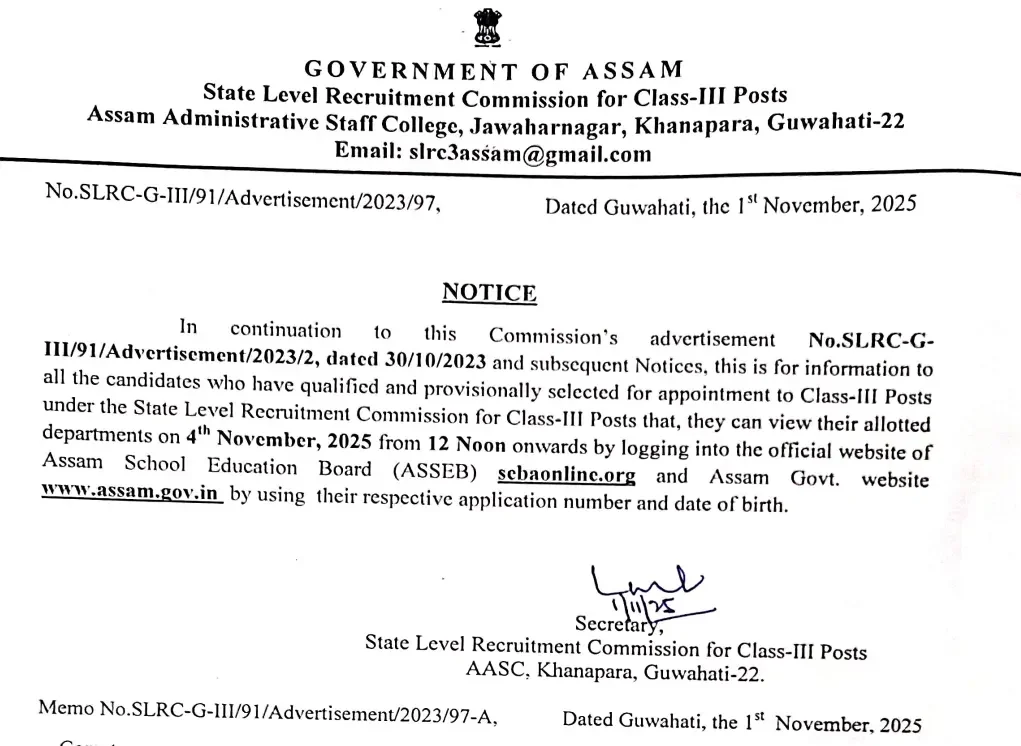
The State Level Recruitment Commission (SLRC), Government of Assam, has officially announced the much-anticipated ADRE Final Allotment List 2025. This crucial announcement marks a major milestone for thousands of aspirants who participated in the Assam Direct Recruitment Examination (ADRE) for Class-III / Grade III positions. Designed to fill a massive total of 7,600 vacancies across various departments in Assam, this final list outlines the specific department allocations for successful candidates.
Candidates who have successfully cleared the recruitment stages can now verify their designated department allocations online. To access the portal and view your posting results for the Class III recruitments, make sure you keep your login credentials handy. You can also view the direct Check ADRE Final Allotment List 2025 – Official Link Active to proceed instantly.
How to Check the ADRE Final Allotment List 2025?
Reviewing your department allocation details is a simple process if you follow the sequential steps outlined below:
- Visit the official website of the Government of Assam, https://assam.gov.in/ or https://site.sebaonline.org/.
- Alternatively, for Grade 3 Result, visit http://slrcg3.sebaonline.org/.
- Now, click on the link against the level of the post you have appeared (HSSLC/ Bachelor’s Degree/ Driver/ HSLC/ Class VIII).
- Under the Important Link section tab, on the link that reads “To view the allocated department, please click on any link below.”
- Enter your Application Number and Date of Birth.
- Fill the Captcha Code and tab on Go button.
- ADRE Final Result appears on the system screen, including Posting Results for Class III recruitments,2025.
- Download the result and save it for future records.
What to Do Next After Checking Your Allotment
Once you have successfully downloaded your allotment confirmation, it is vital to prepare for the subsequent joining procedures. Ensure that you print multiple copies of your final allotment result and safely archive your credentials. Keep an eye out for official notifications from your newly allocated department regarding document verification, medical fitness tests, and reporting timelines.
Frequently Asked Questions (FAQs)
Recommended Reads
- ADRE Result 2025 Declared: Check Grade 3 & Grade 4 Merit List Online
- ADRE Cut Off 2025 Released: Category-Wise Marks for Grade 3 & Grade 4
- Assam ADRE Result 2025: Grade 3 Merit List, Vacancy & Appointment Details
- Punjab Master Cadre Syllabus & Exam Pattern 2026: Complete Guide
- Punjab Master Cadre Recruitment 2026: 2000+ Vacancies, Eligibility & Apply Online
- AIIMS NORCET 11 Prelims Exam City 2026: Release Date, Steps & Details
Exam Photo & Signature Resizer (20KB - 50KB)
Resize passport photo & signature to 20-50KB with Name & Date of Photo (DOP) strip or combine them in 1-click.
Never miss another exam update!
Get the fastest exam results, recruitment news, and educational guides delivered directly to your phone.