An operating system is the core software that commands computer hardware and establishes a bridge between physical components and end users. Understanding how these systems evolved and function is crucial for anyone studying computer science or IT infrastructure.
Evolution and History of Operating Systems
The genesis of operating systems dates back to the late 1950s, when they were developed primarily to manage magnetic tape storage. As hardware progressed by the mid-1960s, technology shifted toward disk-based storage, which paved the way for early Unix systems. Major milestones continued as Microsoft introduced its first OS, known as MS-DOS. Later, in 1985, Microsoft launched Windows, seamlessly integrating a user-friendly Graphical User Interface (GUI) with MS-DOS to revolutionize personal computing.
Features of Operating System
Modern platforms perform a diverse set of critical functions to keep computing environments safe, efficient, and reliable. Below are the primary features managed by an operating system:
- Managing system protection and supervisor mode to ensure hardware integrity.
- Regulating disk access, file systems, and network security via robust device drivers.
- Providing a comprehensive environment for program execution.
- Implementing advanced memory management, virtual memory, and multitasking capabilities.
- Controlling all Input/Output (I/O) operations across the computer system.
- Organizing and manipulating file system structures.
- Detecting and handling hardware or software errors effectively.
- Allocating system resources and managing data flow.
- Ensuring data privacy and resource protection within the system.
Primary Types of Operating Systems
Operating systems are classified into distinct architectural types based on how they process tasks and utilize hardware resources.
1. Batch Operating Systems
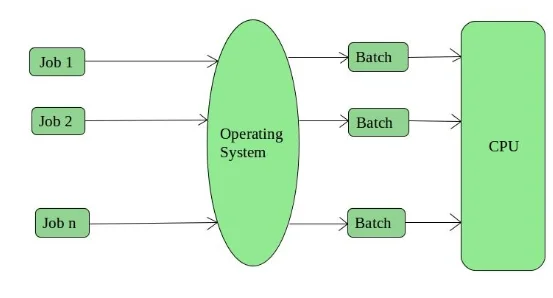
Batch operating systems gather similar jobs into groups, or batches, for sequential processing without direct user interaction. Common examples include payroll processing and bank statement generation.
Advantages of Batch OS
- Job completion time is difficult to predict, as processors manage queues based on batch volume.
- Batch systems allow for shared usage among multiple users.
- Idle CPU time is kept to a minimum.
Disadvantages of Batch OS
- Operators require specialized training to manage batch OS environments.
- Debugging these systems can be challenging.
- Batch-based systems can be costly to maintain.
2. Time-Sharing Operating Systems
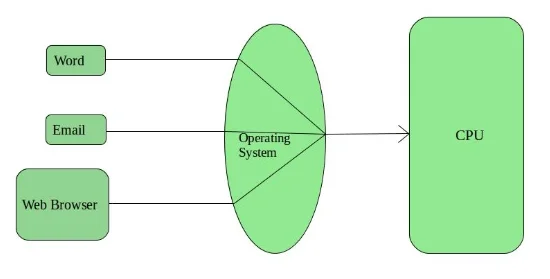
Time-sharing systems allot specific time slices (time quantum) to tasks to ensure smooth operations and multitasking.
Advantages of Time-Sharing OS
- Every process is provided with equal CPU time access.
- Software duplication is significantly minimized.
- Idle CPU cycles are effectively reduced.
Disadvantages of Time-Sharing OS
- Reliability can be an issue under heavy load.
- Robust security measures are required to protect user data.
- Data communication between processes can be complex.
3. Distributed Operating Systems
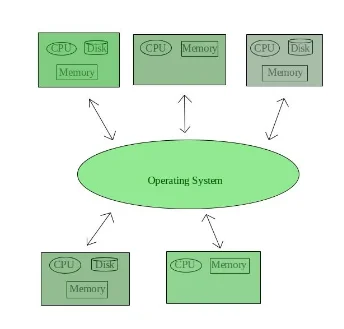
Distributed operating systems consist of autonomous, interconnected computers communicating via a shared network, often classified as loosely coupled systems. LOCUS is a primary example of a Distributed OS.
Advantages of Distributed OS
- Data exchange is accelerated through efficient networking protocols like email.
- Resource sharing leads to increased computation speed and higher system durability.
- The load on any single host system is reduced.
Disadvantages of Distributed OS
- Failure in the primary network can halt the entire system.
- Standardized languages for distributed system development are still evolving.
- Implementation is often expensive and technically complex.
4. Network Operating Systems
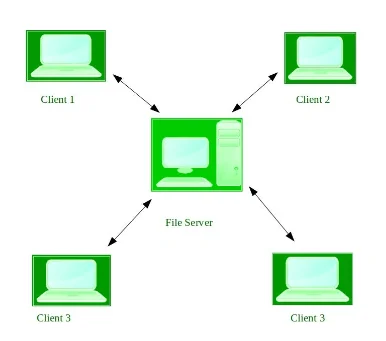
Network operating systems operate on a server to centralize management of users, security, and applications, and are known as tightly coupled systems. Popular examples of Network OS include Microsoft Windows Server editions, UNIX, and Linux-based distributions.
Advantages of Network OS
- Provides a highly stable, centralized management structure.
- Security is centrally managed by server administrators.
- Modern hardware and advanced technologies integrate seamlessly.
Disadvantages of Network OS
- Server infrastructure requires a significant capital investment.
- Users are dependent on the central server for essential services.
- Constant maintenance and regular software updates are mandatory.
5. Real-Time Operating Systems (RTOS)
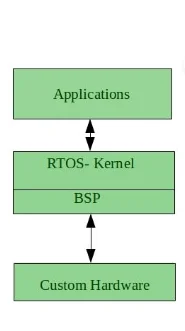
Real-time operating systems (RTOS) are designed for time-critical applications with low response times and are categorized into Hard and Soft Real-time OS. Common applications of RTOS include robotics, medical imaging, weapon systems, and air traffic control.
Advantages of Real-time OS
- The compact nature of these programs makes them ideal for embedded systems like transportation control.
- Designed for high reliability and error-free operation.
- Offers highly optimized memory allocation.
Disadvantages of Real-time OS
- Limited capacity for executing multiple, unrelated tasks.
- The specialized resource requirements often lead to high costs.
- Complex algorithmic design makes modifications or re-engineering difficult.
Frequently Asked Questions (FAQs)
Recommended Reads
- Understanding Computer Software: System & Application Types Explained
- A Complete Guide to Types of Triangles, Properties, and Classifications
- Understanding Types of Computers: A Comprehensive Classification Guide
- Understanding Environmental Pollution: Causes, Effects, and Mitigation Strategies
- Mastering English Grammar: Sentence Types & Structure Explained
- Understanding Writs Under the Indian Constitution: A Comprehensive Legal Guide
CGPA to Percentage Calculator
Convert your college 10-point CGPA or SGPA to equivalent percentage using official university multiplication formulas.
Never miss another exam update!
Get the fastest exam results, recruitment news, and educational guides delivered directly to your phone.